


MagVision Software: Supporting Digital Microscopy and Scientific Image Analysis
Introduction
Microscope observations often need to be captured, documented, measured, or shared with other laboratory users. Digital microscopy software can help streamline these activities by providing tools for working with images beyond direct observation through an eyepiece.
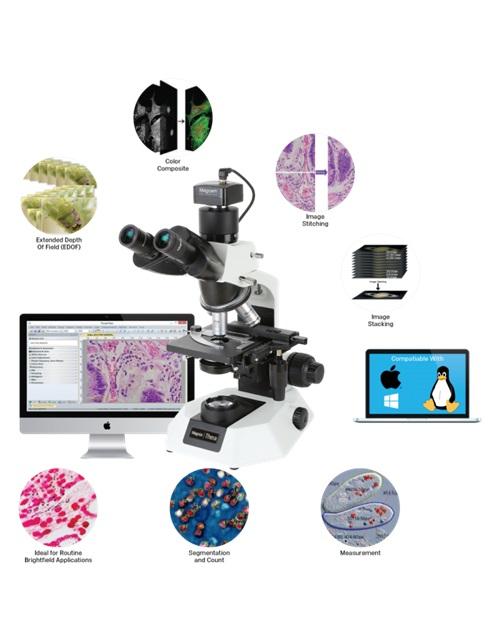
Magnus Opto MagVision software is designed for microscopy-related imaging workflows and includes features that support image enhancement, measurement, annotation, stitching, and stacking.
Image Capture and Enhancement
Digital image workflows allow users to retain visual records of specimens and observations. MagVision includes image enhancement capabilities that can help users work with captured images.
When processing scientific images, it is important to preserve original files and document changes where necessary. Adjustments should not obscure relevant features or misrepresent the specimen, especially when images are used in scientific reports.
Image Measurements and Annotations
MagVision supports measurements on still and live images, as well as annotations on captured images. These functions can help users label observations, document selected features, and prepare images for reports or presentations.
For quantitative measurements, users should ensure the imaging setup is calibrated appropriately. Measurement accuracy depends on the microscope, camera, calibration procedure, and analysis method, not software alone.
Image Stitching and Stacking
MagVision includes image stitching and image stacking functions.
-
Image stitching can combine overlapping images to create a wider view of a specimen.
-
Image stacking can combine images captured at different focus positions to produce a composite with a greater apparent depth of field.
The quality of these results depends on image capture conditions, sample characteristics, and the processing workflow.
Saving and Sharing Images
MagVision supports saving images in formats including JPG, TIFF, and BMP, as well as DICOM. It also supports saving videos in AVI format. Users should confirm that the required formats and workflows are supported by their particular configuration.
The software is listed as compatible with Windows, Linux, and Mac operating systems. Check the official product information for the applicable system and hardware requirements.
Which Microscope Should You Pair with Digital Imaging?
Your microscope selection should reflect the type of specimens being examined and the imaging workflow required.
For clinical applications, explore the MX21i microscope. For other laboratory and life-science applications, consider the MLXi Plus microscope. Confirm that the selected microscope, camera, adapters, and software work together before purchase.
Explore MagVision Software
Whether you need to document microscope observations, annotate images, or explore image stitching and stacking, it is important to select software based on your actual workflow.
Visit the official MagVision software page to review its features and compatibility details.
Frequently Asked Questions
1. What is MagVision software used for?
MagVision supports microscopy image workflows, including image enhancement, measurements, annotations, stitching, and stacking.
2. Can MagVision measure microscope images?
Yes. The product information lists measurement functionality for still and live images. Accurate quantitative results require appropriate calibration.
3. Does MagVision support image stitching?
Yes. Image stitching is among its listed features and can be used to combine overlapping images.
4. Can MagVision save microscope videos?
The listed video format is AVI. Confirm any specific recording requirements against the software configuration.
5. Which operating systems does MagVision support?
The official product information lists Windows, Linux, and Mac compatibility. Check version-specific requirements before installation.
6. Where can I find MagVision specifications?
Visit the official Magnus Opto MagVision software page.

 Arabic
 French
 Spanish
 Portuguese
 Deutsch
 Turkish
 Dutch
Dutch
 Italiano
 Russian
 Romaian
 Portuguese (Brazil)
 Greek
Greek
