


eFootball 2026 PPSSPP: What You Need to Know
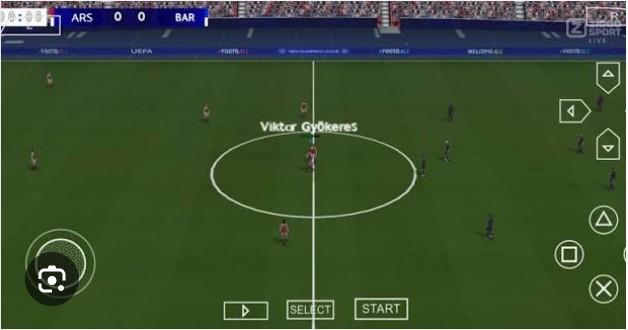
Quick answer: eFootball 2026 PPSSPP is a fan-made, modified version of Konami's eFootball series adapted to run on the PPSSPP emulator for Android and iOS devices. These patched ISO files feature updated squads, kits, and transfers for the 2025–26 season, offering an offline football gaming experience on mobile without requiring a high-end device.
Football gaming on mobile has never been more accessible—and for millions of players across Africa, Asia, and Latin America, PPSSPP remains the go-to platform for console-quality football on budget devices. eFootball 2026 PPSSPP builds on that legacy, combining the beloved gameplay mechanics of classic Pro Evolution Soccer (PES) titles with fresh 2025–26 season updates.
But what exactly is eFootball 2026 PPSSPP? How does it work, and is it safe to download? This guide covers everything you need to know—from what the game offers to how to get it running smoothly on your device.
What Is eFootball 2026 PPSSPP?
eFootball 2026 PPSSPP is not an official Konami release. It is a community-built patch applied to a PES or eFootball ISO file, modified to include updated player rosters, transfer data, kits, and stadium details for the 2025–26 football season. The result is a football game that feels current, even on older hardware.
PPSSPP itself is a free, open-source PlayStation Portable (PSP) emulator developed by Henrik Rydgård. It allows Android, iOS, Windows, and Mac devices to run PSP game files. Because PES titles were widely available on the PSP, they became the natural foundation for these community patches.
The modding community behind these files typically updates the following:
- Player transfers and ratings — reflecting the latest squad changes across top leagues
- Club and national team kits — home, away, and third kits for the 2025–26 season
- Player faces — high-definition face packs for star players
- Boots and accessories — updated in-game gear matching real-world releases
- Commentary and soundtrack updates — some patches include refreshed audio files
Why Do Players Choose eFootball 2026 PPSSPP Over the Official App?
The official eFootball 2025 app from Konami is free to download but demands a stable internet connection and a relatively modern smartphone to run well. For players in regions with inconsistent connectivity or older devices, the app often stutters, crashes, or simply refuses to install.
eFootball 2026 PPSSPP sidesteps all of that. The game runs entirely offline once downloaded, performs reliably on mid-range and even low-end Android devices, and does not require any in-app purchases to access the full squad database. That combination makes it genuinely compelling for a huge segment of the global football gaming audience.
There is also a strong nostalgia factor. PES 2012 through PES 2021 are widely regarded as the high point of Konami's football simulation gameplay. Many players feel the transition to eFootball's free-to-play model sacrificed depth for monetization. The PPSSPP patches preserve those mechanics while layering in modern content—arguably giving players the best of both eras.
What Features Does eFootball 2026 PPSSPP Typically Include?
Patches vary depending on the creator, but most well-regarded eFootball 2026 PPSSPP files include a consistent set of features:
Updated Rosters and Transfers
Squad files are rebuilt to reflect the summer 2025 transfer window, meaning marquee moves are captured accurately. Player ratings, positions, and attributes are adjusted to match current form where possible.
High-Definition Graphics Improvements
Many patches include texture upgrades that push visual fidelity beyond what the original PSP hardware ever rendered. Grass textures, crowd details, and player models benefit from these enhancements, especially when PPSSPP's rendering resolution is set above native.
New Stadiums and Menus
Some modders rebuild stadium files to include venues that never appeared in the original PSP versions, along with refreshed menu interfaces that mirror the visual identity of modern eFootball branding.
Offline Game Modes
Master League, Become a Legend, and exhibition matches are all fully playable offline. These modes give the game considerable depth and replayability without requiring an internet connection.
How to Download and Install eFootball 2026 PPSSPP on Android
Before getting started, make sure your Android device has at least 2GB of RAM and approximately 600MB–1.5GB of free storage, depending on the patch size.
Step 1: Download the PPSSPP emulator
Install PPSSPP Gold or the free version of PPSSPP from the Google Play Store. PPSSPP Gold supports the developers directly and offers a minor performance boost on some devices.
Step 2: Find a reputable eFootball 2026 PPSSPP ISO file
Source your ISO or CSO file from a trusted football gaming community or modding forum. Avoid unfamiliar download sites, as poorly sourced files can carry malware. Communities on Reddit (r/PPSSPP) and dedicated football gaming forums often vet and recommend reliable patch creators.
Step 3: Extract the downloaded file
Most patches are distributed as compressed ZIP or RAR files. Use ZArchiver (free on the Play Store) to extract the ISO/CSO file to your internal storage or SD card.
Step 4: Load the game in PPSSPP
Open PPSSPP, navigate to the folder where you extracted the ISO, and tap the file to launch the game. On first load, PPSSPP will prompt you to configure basic settings.
Step 5: Optimize your settings
For the smoothest experience, set the rendering resolution to 2x PSP (or higher if your device can handle it), enable hardware transform, and turn on texture scaling. These settings significantly improve visual quality without major performance hits on most mid-range devices.
Is eFootball 2026 PPSSPP Legal and Safe to Download?
This is where things get complicated. PPSSPP as an emulator is entirely legal. Downloading ISO files for games you do not own a physical copy of sits in a legal grey area in most jurisdictions—and in some countries, it constitutes copyright infringement under applicable intellectual property law.
From a safety standpoint, the risks depend heavily on the source. Reputable patches from well-known modding communities are generally safe. Random files hosted on obscure sites carry real risks, including adware, spyware, and in rare cases, more serious malware. Always scan downloaded files with a reputable antivirus app before extracting or launching them.
The safest approach is to download patches from creators who have an established presence in the football gaming community, have published previous patches, and have a track record of positive user feedback.
Tips for Getting the Best Performance on Low-End Devices
Running PPSSPP on older hardware requires a bit of fine-tuning. These adjustments can make a meaningful difference:
- Lower the rendering resolution to 1x PSP if the game stutters. This reduces visual quality but dramatically improves frame rate.
- Disable post-processing shaders — effects like bloom and blur consume processing power without adding much to gameplay.
- Enable fast memory in PPSSPP's system settings. This can speed up load times on devices with slower storage.
- Close background apps before launching the game to free up RAM.
- Use a wired controller via USB OTG if you find touch controls imprecise. PPSSPP has robust controller support built in.
The Future of PPSSPP Football Gaming
The PPSSPP modding scene shows no signs of slowing down. Each new football season brings a fresh wave of patches, and the community of creators continues to push the boundaries of what the emulator can render. Some modders have begun experimenting with AI-assisted face generation, which promises even more realistic player likenesses in future patches.
Konami's official eFootball roadmap continues to evolve, but the gap between what the official app demands and what budget devices can deliver remains wide. Until that gap closes, eFootball 2026 PPSSPP will keep drawing players who want modern football content on accessible hardware.
Is eFootball 2026 PPSSPP Worth Playing?
For football fans with mid-range or older Android devices, eFootball 2026 PPSSPP delivers a surprisingly complete football gaming experience. The gameplay foundation—drawn from classic PES titles—remains excellent. The community updates keep the content relevant. And the offline-first design makes it genuinely playable anywhere.
The caveats are real: this is not an official product, sourcing safe files requires caution, and the installation process demands a few extra steps. But for players who have navigated PPSSPP patches before, or are willing to learn, the payoff is a full-featured football game that runs on almost any Android device, costs nothing, and does not ask for an internet connection.
That is a hard combination to beat.
Frequently Asked Questions
What is the file size of eFootball 2026 PPSSPP?
File sizes vary by patch creator, but most eFootball 2026 PPSSPP ISO or CSO files range from 400MB to 1.2GB after extraction. Compressed download files are typically smaller.
Can eFootball 2026 PPSSPP be played on iOS?
PPSSPP is available for iOS, though installation is more complex than on Android and may require sideloading via AltStore or similar tools. Most players run eFootball 2026 PPSSPP on Android, where the process is more straightforward.
Does eFootball 2026 PPSSPP require an internet connection?
No. Once downloaded and installed, eFootball 2026 PPSSPP runs entirely offline. This is one of its primary advantages over the official eFootball mobile app.
Which base game is eFootball 2026 PPSSPP built on?
Most patches are built on PES 2021 PSP, PES 2017 PSP, or PES 2012 PSP. The base game determines the core gameplay engine and available game modes.
Can I use a controller with eFootball 2026 PPSSPP on Android?
Yes. PPSSPP supports Bluetooth and USB OTG controllers on Android. Most modern gamepads are compatible, including PlayStation DualShock 4, DualSense, and Xbox controllers.
Is the PPSSPP emulator itself free?
PPSSPP offers a free version available on the Google Play Store and at ppsspp.org. PPSSPP Gold is a paid version that supports the development team and offers minor performance improvements.

 English
 Arabic
 French
 Spanish
 Portuguese
 Deutsch
 Turkish
 Dutch
Dutch
 Italiano
 Russian
 Portuguese (Brazil)
 Greek
Greek