


Why Every Marketer Needs an HTML Email Builder for Better Email Design
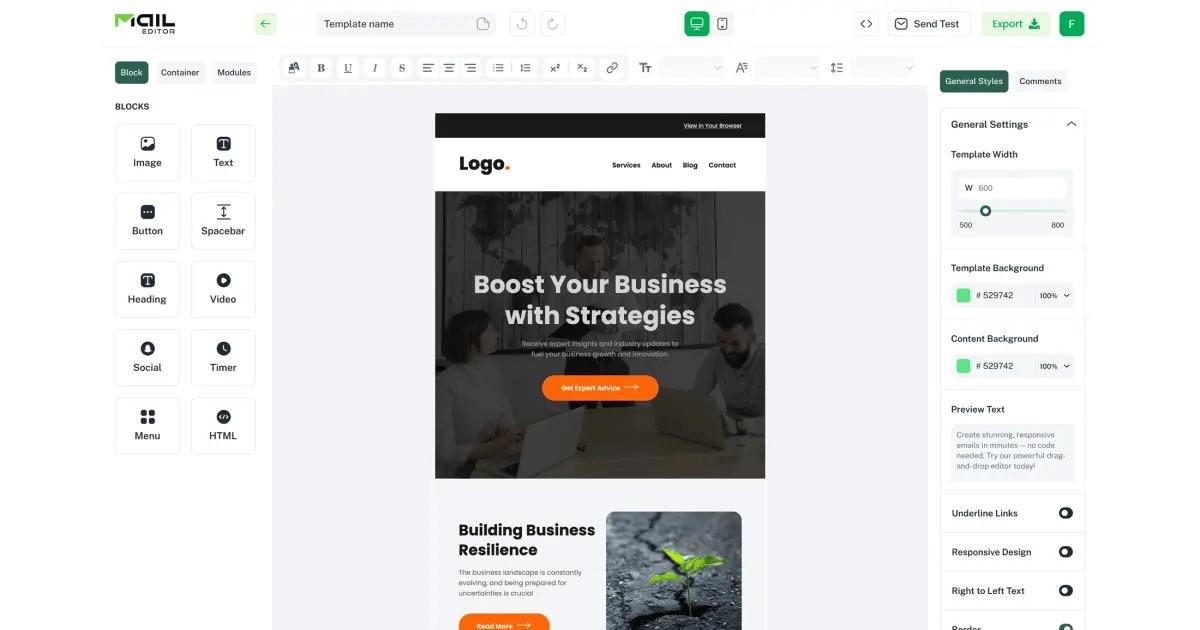
Email marketing is one of the most practical channels for building customer relationships and promoting products or services. However, the success of an email campaign depends heavily on design quality. A poorly designed email can make a brand look unprofessional, while a clean and responsive email can increase trust, engagement, and clicks.
For marketers who want to create better campaigns without spending too much time on code, MailEditor can be a useful solution. It helps simplify the email design process and gives marketers more control over how their campaigns look.
The Role of Design in Email Marketing
Many marketers focus only on subject lines and copywriting. These are important, but design is equally valuable. When a subscriber opens an email, the design decides whether the message feels professional or confusing. Good design helps readers understand the offer quickly.
A strong email layout includes a clear headline, short content blocks, attractive visuals, and visible call-to-action buttons. When these elements are placed correctly, users can scan the email easily and decide what to do next.
Why Manual HTML Editing Can Be Difficult
HTML emails are different from normal website pages. Email clients can display code in different ways, and a small mistake can break the layout. This makes manual email coding difficult for non-technical marketers.
Marketers often need to adjust colors, replace images, edit text, move sections, and update buttons. If they must do all of this inside raw HTML code, the process becomes slow and risky. A simple mistake can affect the final email design.
Benefits of Using a Visual Builder
Faster Campaign Creation
A visual HTML email builder helps marketers design and edit emails more quickly. Instead of building the structure from the beginning every time, users can start with a layout and customize it according to the campaign goal.
This saves valuable time, especially when campaigns need to be launched regularly. A marketer can prepare newsletters, promotional emails, sale announcements, and product updates without waiting for a developer.
Better Control Over Branding
Brand consistency is important in every marketing channel. Emails should match the same colors, fonts, logo style, and tone that the business uses on its website and social media. A visual builder makes it easier to keep this consistency across multiple campaigns.
How Templates Improve Workflow
Starting with a template is often easier than starting from a blank screen. An email templates builder allows marketers to choose a layout and then customize it for their brand. This helps maintain a professional appearance while reducing the time needed to create each campaign.
Templates are useful for different industries and campaign types. A business can use one structure for newsletters, another for sales promotions, and another for customer onboarding. This flexibility helps marketers work smarter.
Why MailEditor Is Useful for Marketers
MailEditor helps marketers create, customize, and prepare HTML email designs without making the workflow too complicated. It is useful for people who want to edit existing templates, build new layouts, and export emails for use with different email marketing platforms.
For agencies, this type of tool is helpful because client work often requires fast revisions. When a client asks for text changes, color updates, or layout adjustments, the team can make edits visually instead of rewriting the full code.
Free Templates for Testing Ideas
Campaign testing is a normal part of email marketing. Marketers often test different layouts, content styles, call-to-action buttons, and visual sections. free HTML email templates can help with this process because they provide ready-made layouts that can be customized and tested.
Using free templates also reduces the cost of starting. New businesses can create professional-looking campaigns before investing in custom designs. This can be especially helpful for startups, freelancers, and small ecommerce stores.
Tips for Better Email Design
Keep the Message Clear
Every email should focus on one main message. Too many offers or too much text can confuse the reader. A simple headline and direct call to action often work better.
Make It Mobile-Friendly
Most users check emails on mobile devices. Marketers should always make sure the email layout, text size, images, and buttons work well on smaller screens.
Use Strong Calls to Action
The call-to-action button should be easy to find. Whether the goal is to visit a website, buy a product, download a guide, or book a demo, the button should clearly tell users what to do.
Conclusion
Every marketer needs tools that save time and improve campaign quality. A good email design platform helps marketers create professional emails, maintain branding, test campaign ideas, and reduce dependency on coding.
MailEditor can support this process by making HTML email design more accessible for marketing teams, agencies, and small businesses. With the right builder and templates, marketers can create better emails and improve the overall performance of their campaigns.

 English
 Arabic
 French
 Portuguese
 Deutsch
 Turkish
 Dutch
Dutch
 Italiano
 Russian
 Romaian
 Portuguese (Brazil)
 Greek
Greek