


Why Should Businesses Choose Custom ERP API Integration Solutions?
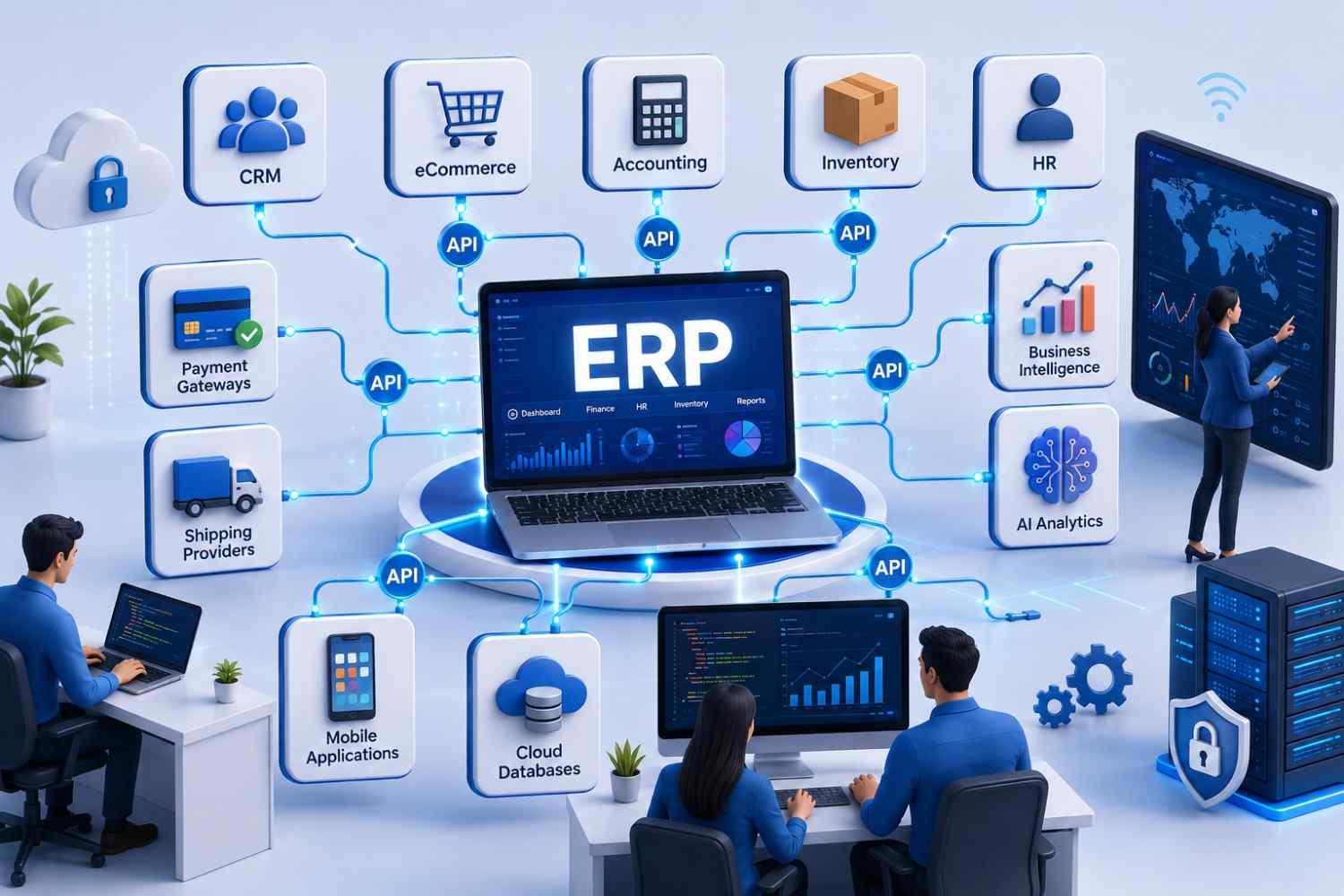
Modern businesses rarely depend on a single software platform. Sales teams work inside CRM systems, finance relies on accounting software, warehouses use inventory management platforms, while marketing, HR, and customer support often operate through separate applications. Although each tool performs its own function well, disconnected systems create information gaps that slow decision-making and reduce operational efficiency.
Custom ERP API Integration solves this challenge by allowing every critical business application to exchange information automatically. Instead of manually copying data between systems, businesses can create a unified digital ecosystem where information flows securely and in real time. This improves productivity, minimizes errors, enhances customer experiences, and provides leadership with accurate business insights.
In this guide, we explain what Custom ERP API Integration is, how it works, why businesses increasingly prefer customized integration over standard connectors, and how the right implementation can support long-term business growth.
What Is Custom ERP API Integration?
Custom ERP API Integration is the process of connecting an Enterprise Resource Planning (ERP) system with other business applications using Application Programming Interfaces (APIs). Unlike generic plug-and-play integrations, custom solutions are designed specifically for a company's unique workflows, business rules, security requirements, and operational goals.
An ERP system acts as the central hub for business operations, while APIs allow different software platforms to communicate securely. Custom integration ensures that information flows between systems exactly as the business requires rather than forcing teams to adapt to the limitations of pre-built connectors.
For example, a manufacturing company may need its ERP system to exchange data with:
- CRM software
- eCommerce platforms
- Accounting software
- Supplier portals
- Shipping providers
- HR management systems
- Payment gateways
- Business intelligence tools
- Mobile applications
- AI analytics platforms
Instead of employees manually updating multiple systems, APIs automatically synchronize information across the organization.
Why Does Custom ERP API Integration Matter?
Digital transformation is no longer limited to large enterprises. Businesses of all sizes now depend on multiple software platforms to manage operations, customers, finances, inventory, logistics, and reporting. Without proper integration, valuable data remains isolated in separate systems, creating unnecessary complexity.
Custom ERP API Integration eliminates these silos by building direct communication channels between applications. This creates a single source of truth for business information, allowing teams to make faster and more informed decisions.
Businesses typically choose custom integration because it helps them:
- Reduce manual data entry
- Improve reporting accuracy
- Automate repetitive tasks
- Accelerate order processing
- Enhance customer service
- Support future software expansion
- Improve operational visibility
- Maintain data consistency across departments
Rather than replacing existing software, integration maximizes the value of current technology investments.
Common Business Challenges Without ERP API Integration
Many organizations continue to operate with disconnected software because systems were implemented at different stages of business growth. While each application performs well individually, the lack of integration creates operational bottlenecks that become more expensive over time.
Duplicate Data Entry
Employees often enter identical information into multiple systems. This repetitive work increases labor costs and introduces avoidable human errors.
Data Inconsistency
Customer records, inventory levels, invoices, and order statuses frequently differ between platforms, making it difficult to determine which information is accurate.
Delayed Decision-Making
Executives depend on timely reports. When information must be collected manually from multiple systems, reporting becomes slower and less reliable.
Poor Customer Experience
Customers expect accurate inventory availability, shipment tracking, and billing information. Disconnected systems can result in delayed updates, incorrect orders, and inconsistent communication.
Limited Scalability
As businesses adopt additional software solutions, manual processes become increasingly difficult to manage, reducing overall efficiency.
Key Features of Custom ERP API Integration
A professionally developed integration solution provides far more than simple data synchronization. It becomes an intelligent communication layer that supports business operations across multiple departments.
Real-Time Data Synchronization
Changes made in one system automatically update connected applications within seconds, reducing delays and ensuring consistent information.
Secure Authentication
Modern APIs use secure authentication methods such as OAuth, API keys, and encrypted communication protocols to protect sensitive business data.
Workflow Automation
Routine tasks—including invoice creation, order processing, inventory updates, and customer notifications—can be triggered automatically based on predefined business rules.
Bidirectional Data Exchange
Information moves both ways between applications, ensuring every connected system stays synchronized without manual intervention.
Error Monitoring
Custom integrations include logging, alerts, and monitoring tools that quickly identify failed transactions before they affect business operations.
Flexible Business Rules
Every organization operates differently. Custom API integration allows workflows to reflect company-specific approval processes, pricing models, inventory policies, and operational requirements.
How Does Custom ERP API Integration Work?
Although the underlying technology can be sophisticated, the integration process follows a logical sequence.
Step 1: Data Request
One business application sends a request to the ERP API.
Step 2: Authentication
The API verifies permissions to ensure only authorized systems can access business data.
Step 3: Data Processing
The ERP processes the request according to predefined business rules.
Step 4: Data Exchange
Required information is securely transmitted to the requesting application.
Step 5: Automatic Synchronization
Connected systems update instantly, keeping all departments aligned with the latest information.
This automated communication significantly reduces delays while improving operational accuracy.
Step-by-Step ERP API Integration Process
Implementing a successful integration requires careful planning rather than simply connecting two software platforms.
1. Business Process Assessment
We begin by identifying existing workflows, pain points, and integration goals.
2. System Analysis
Each application's APIs, data structure, authentication methods, and compatibility are evaluated.
3. Integration Architecture Design
Developers design a scalable architecture that supports current requirements while accommodating future growth.
4. API Development
Custom APIs, middleware, or connectors are developed where required.
5. Security Implementation
Authentication, encryption, access controls, and compliance measures are incorporated throughout the integration.
6. Testing
Functional testing, performance testing, security validation, and data accuracy checks ensure reliable operation before deployment.
7. Deployment and Monitoring
After launch, continuous monitoring helps maintain performance while identifying opportunities for optimization.
Technology Stack for Custom ERP API Integration
Selecting the right technology stack is essential for building reliable, secure, and scalable ERP integrations. The ideal stack depends on your existing ERP platform, third-party applications, business complexity, and future expansion plans. Rather than focusing on a single technology, successful integrations combine modern APIs, middleware, cloud services, databases, and security frameworks that work together seamlessly.
Backend Technologies
Robust backend technologies handle business logic, API requests, and data transformation. Popular choices include:
- .NET
- Java
- Python
- Node.js
- PHP (Laravel)
These technologies support RESTful APIs, authentication, scheduling, logging, and integration with enterprise systems.
API Standards
Modern integrations typically use:
- REST APIs
- GraphQL APIs
- SOAP APIs (for legacy ERP systems)
- Webhooks
- JSON and XML data formats
Choosing the appropriate API standard depends on compatibility, performance, and business requirements.
Databases
Integrated systems commonly work with databases such as:
- Microsoft SQL Server
- PostgreSQL
- MySQL
- Oracle Database
- MongoDB
Proper database synchronization ensures accurate reporting and prevents duplicate or conflicting information.
Cloud Platforms
Cloud infrastructure provides scalability and reliability.
Common deployment platforms include:
- Microsoft Azure
- Amazon Web Services (AWS)
- Google Cloud Platform (GCP)
Cloud hosting enables automatic scaling, backup, monitoring, and disaster recovery.
Security Technologies
Enterprise integrations should include:
- OAuth 2.0 Authentication
- JWT Tokens
- SSL/TLS Encryption
- API Rate Limiting
- Role-Based Access Control (RBAC)
- Audit Logging
These security measures protect sensitive business information while maintaining compliance.
Benefits of Custom ERP API Integration
Custom ERP API Integration offers long-term business value beyond simple software connectivity. It streamlines operations, improves data visibility, and enables organizations to respond faster to changing business demands.
1. Improved Operational Efficiency
Manual processes often consume valuable employee time. API integration automates repetitive tasks such as order creation, invoice generation, inventory updates, and customer record synchronization. Employees can focus on strategic work instead of administrative activities.
2. Better Data Accuracy
When multiple systems are updated manually, inconsistencies become inevitable. Custom integrations synchronize information automatically, reducing human error and ensuring all departments work with the same data.
3. Faster Business Decisions
Real-time dashboards and synchronized reporting provide management with up-to-date information, allowing quicker responses to inventory shortages, customer demands, and financial performance.
4. Enhanced Customer Experience
Customers expect accurate order tracking, product availability, invoices, and support information. Integrated systems improve communication while reducing fulfillment delays and service errors.
5. Lower Operating Costs
Automation decreases repetitive administrative work, reduces costly mistakes, and minimizes the need for manual reconciliation between systems.
6. Easier Business Expansion
As businesses adopt new software, custom integrations make it easier to connect additional applications without disrupting existing workflows.
7. Increased Scalability
Whether processing hundreds or millions of transactions, well-designed APIs can grow alongside the business without requiring complete system replacement.
8. Improved Compliance and Security
Custom integrations include audit logs, permission controls, encrypted communication, and standardized workflows that simplify regulatory compliance and data governance.
Real Business Examples
Understanding how organizations use ERP API Integration helps illustrate its practical value.
Example 1: Manufacturing Company
A manufacturer integrates its ERP with production planning software and supplier portals.
Result:
- Raw material inventory updates automatically.
- Purchase orders are generated based on stock levels.
- Production schedules adjust in real time.
- Supplier deliveries become more predictable.
Example 2: eCommerce Business
An online retailer connects its ERP with Shopify, payment gateways, shipping providers, and CRM software.
Result:
- Orders enter the ERP instantly.
- Inventory updates automatically across all sales channels.
- Shipping labels are generated automatically.
- Customers receive real-time tracking information.
Example 3: Healthcare Provider
A healthcare organization integrates its ERP with appointment scheduling, billing, and patient management systems.
Result:
- Billing becomes more accurate.
- Administrative work decreases.
- Financial reporting improves.
- Patient services become more efficient.
Example 4: Wholesale Distributor
A distributor connects warehouse management software with ERP and logistics providers.
Result:
- Stock visibility improves.
- Delivery planning becomes more accurate.
- Purchase planning is automated.
- Customer orders are fulfilled faster.
Case Study: Automating Operations for a Growing Distribution Company
A mid-sized distribution company relied on separate systems for inventory management, accounting, customer relationship management, and shipping. Employees manually transferred order details between applications, resulting in delays, duplicate records, and frequent inventory discrepancies. As order volumes increased, these inefficiencies began affecting customer satisfaction and operational costs.
We designed a Custom ERP API Integration solution that connected the company’s ERP with its CRM, warehouse management system, accounting software, and logistics partners. Orders placed through the CRM were automatically synchronized with the ERP, inventory levels updated in real time, invoices were generated instantly, and shipment tracking information flowed back to customer service teams without manual intervention.
Within a few months, the company significantly reduced administrative workload, improved inventory accuracy, shortened order processing times, and gained real-time visibility into business performance. Management could make faster decisions using consolidated dashboards, while customers benefited from quicker deliveries and more accurate order updates. The project also created a scalable integration framework, making it easier to connect future business applications without major redevelopment.
Industry Applications
Custom ERP API Integration is valuable across many industries because every organization depends on connected business data.
| Industry | Common Integrations | Business Benefits |
|---|---|---|
| Manufacturing | Production, Procurement, Inventory | Better production planning |
| Retail & eCommerce | Online stores, Payment Gateways | Faster order processing |
| Healthcare | Patient Systems, Billing | Improved operational efficiency |
| Logistics | Fleet, Warehouse, Shipping | Real-time shipment visibility |
| Finance | Accounting, Payroll | Accurate financial reporting |
| Construction | Project Management | Resource planning |
| Education | Student Management | Administrative automation |
| Real Estate | CRM, Accounting | Property and client management |
Common Mistakes to Avoid
Even well-planned integration projects can encounter challenges if critical considerations are overlooked.
Choosing Standard Connectors for Complex Processes
Pre-built integrations are useful for basic workflows but often lack the flexibility required for unique business operations.
Ignoring Security Requirements
Failing to implement encryption, authentication, or access controls increases the risk of unauthorized data access and compliance issues.
Poor Data Mapping
Incorrect field mapping between systems can create duplicate records, inaccurate reporting, and synchronization failures.
Skipping Performance Testing
An integration that performs well with limited data may struggle as transaction volumes grow. Load testing helps identify scalability issues before deployment.
Lack of Monitoring
Without automated monitoring and error alerts, synchronization failures may remain unnoticed until they disrupt business operations.
No Long-Term Integration Strategy
Businesses should design integrations that accommodate future applications, upgrades, and organizational growth rather than solving only immediate needs.
Best Practices for Successful ERP API Integration
Following proven implementation practices improves project outcomes and long-term reliability.
- Clearly define business objectives before development begins.
- Document workflows and data requirements.
- Use standardized API documentation.
- Implement strong authentication and encryption.
- Design integrations with scalability in mind.
- Validate data before synchronization.
- Monitor API performance continuously.
- Schedule regular maintenance and updates.
- Keep detailed audit logs for troubleshooting and compliance.
- Partner with an experienced Custom ERP Software Development Company for architecture, development, testing, and ongoing support.
Future Trends in Custom ERP API Integration
As businesses continue adopting cloud platforms, AI, and automation, ERP integrations are becoming more intelligent and event-driven. Modern integration strategies are no longer limited to transferring data—they enable real-time business decisions, predictive insights, and seamless collaboration across digital ecosystems.
AI-Powered Workflow Automation
Artificial intelligence is transforming ERP integrations by automating routine decisions. AI can categorize support tickets, forecast inventory demand, recommend purchase orders, and identify unusual transactions without manual intervention.
Event-Driven Architecture
Instead of scheduled data synchronization, event-driven APIs trigger updates instantly when a business event occurs, such as a new order, payment confirmation, or inventory change. This reduces delays and ensures every connected application has the latest information.
API-First ERP Platforms
Leading ERP vendors are increasingly adopting an API-first approach, making it easier to connect with CRM systems, eCommerce platforms, mobile apps, analytics tools, and third-party services.
Low-Code and No-Code Integration
Low-code platforms allow businesses to automate simpler workflows quickly. However, custom API integration remains the preferred choice for organizations with complex business logic, advanced security requirements, or enterprise-scale operations.
Cloud-Native Integrations
Cloud-native ERP solutions are designed to scale automatically, making integrations more reliable and easier to maintain across multiple locations and remote teams.
Enhanced Security and Compliance
With growing concerns around cybersecurity and data privacy, future integrations will include stronger encryption, zero-trust security models, continuous monitoring, and compliance with industry regulations.
Custom ERP API Integration vs Standard Integration
| Feature | Custom ERP API Integration | Standard Integration |
|---|---|---|
| Flexibility | Fully customized for business workflows | Limited to predefined functionality |
| Scalability | Easily adapts as the business grows | May require replacement for advanced needs |
| Performance | Optimized for specific processes | General-purpose performance |
| Security | Custom authentication and access controls | Standard security features |
| Data Mapping | Tailored to unique business rules | Fixed mapping options |
| Third-Party Connectivity | Supports virtually any compatible application | Limited supported applications |
| Maintenance | Easier to enhance over time | Dependent on vendor updates |
| Long-Term Value | High ROI for growing businesses | Suitable mainly for simple requirements |
ERP API Integration Process at a Glance
| Stage | Objective | Outcome |
|---|---|---|
| Business Analysis | Understand workflows and goals | Clear integration strategy |
| API Assessment | Evaluate existing systems | Compatibility roadmap |
| Solution Design | Define architecture | Scalable integration framework |
| Development | Build APIs and connectors | Secure data exchange |
| Testing | Validate functionality and performance | Reliable deployment |
| Deployment | Launch integration | Automated business operations |
| Monitoring | Track health and performance | Continuous optimization |
Key Takeaways
- Custom ERP API Integration connects business applications into one unified ecosystem.
- Real-time data synchronization eliminates manual entry and improves accuracy.
- Custom integrations are more flexible and scalable than standard connectors.
- Secure APIs protect sensitive business information while enabling seamless communication.
- Automation reduces operational costs and improves employee productivity.
- Businesses across manufacturing, retail, healthcare, logistics, and finance can benefit from ERP API Integration.
- Careful planning, testing, and ongoing monitoring are essential for long-term success.
- Investing in a custom integration strategy helps organizations adapt to future growth and technology changes.
Conclusion
As businesses adopt more digital tools, seamless connectivity between systems becomes essential for maintaining efficiency and delivering exceptional customer experiences. Disconnected applications lead to duplicated work, inconsistent data, and slower decision-making, all of which limit growth.
Custom ERP API Integration addresses these challenges by creating secure, automated connections between your ERP and the software your teams use every day. Whether you need to synchronize customer data, automate inventory updates, streamline financial reporting, or connect multiple business platforms, a tailored integration solution provides the flexibility and scalability that standard connectors often cannot deliver.
By investing in a well-designed integration strategy, businesses can improve operational efficiency, enhance data accuracy, reduce costs, and build a technology foundation that supports future innovation and expansion.
Frequently Asked Questions
1. What is Custom ERP API Integration?
Custom ERP API Integration connects an ERP system with other business applications using tailored APIs. Unlike standard integrations, it is built around your organization's workflows, security requirements, and operational goals.
2. Why should businesses choose custom ERP API integration instead of pre-built connectors?
Pre-built connectors are suitable for simple use cases, but they often cannot handle complex workflows or unique business rules. Custom integrations provide greater flexibility, scalability, and long-term reliability.
3. Which business applications can integrate with an ERP system?
ERP systems can integrate with:
- CRM platforms
- eCommerce websites
- Accounting software
- HR systems
- Inventory management
- Warehouse management
- Payment gateways
- Shipping providers
- Business intelligence tools
- Mobile applications
4. How long does an ERP API integration project take?
The timeline depends on the number of systems, integration complexity, data mapping requirements, and testing needs. Simple projects may take a few weeks, while enterprise implementations can span several months.
5. Is ERP API Integration secure?
Yes. When developed using industry best practices, integrations include encrypted communication, secure authentication, role-based access controls, audit logs, and continuous monitoring to protect business data.
6. Can legacy ERP systems be integrated with modern applications?
In many cases, yes. Legacy systems can often connect through APIs, middleware, or custom connectors, allowing businesses to modernize gradually without replacing their ERP immediately.
7. What are the biggest benefits of ERP API Integration?
Key benefits include:
- Automated workflows
- Real-time data synchronization
- Improved operational efficiency
- Better reporting
- Reduced manual errors
- Enhanced customer experiences
- Easier scalability
8. Does every business need custom ERP API integration?
Not every organization requires a fully customized solution. Businesses with multiple software systems, complex workflows, or growth plans benefit the most from custom integrations.
9. How do APIs improve ERP performance?
APIs enable systems to exchange data automatically and in real time, reducing manual work, improving data accuracy, and ensuring consistent information across departments.
10. How do we choose the right ERP API integration partner?
Look for a development partner with experience in ERP platforms, API architecture, cloud technologies, security, and long-term support. Review previous projects, technical expertise, and their ability to design solutions that align with your business goals.

 English
 Arabic
 French
 Spanish
 Portuguese
 Deutsch
 Turkish
 Dutch
Dutch
 Italiano
 Romaian
 Portuguese (Brazil)
 Greek
Greek
