


Optimizing High-Performance Computing: A Comprehensive Structural Analysis of Modern Storage Media and System Economics
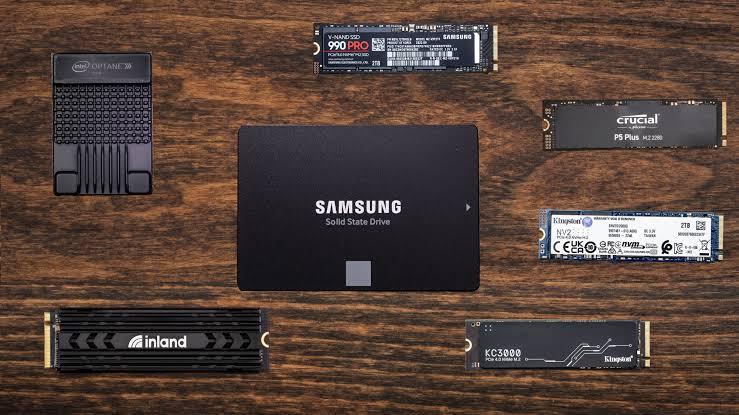
Selecting the appropriate storage foundation is one of the most critical engineering choices when building, upgrading, or scaling a high-performance computer system. Modern digital workloads—spanning professional 8K video production, large-scale relational database management, ultra-realistic gaming environments, and high-intensity artificial intelligence model training—demand extraordinary data transfer speeds and flawless reliability. As hardware capabilities advance rapidly, understanding how traditional magnetic media compares against next-generation solid-state technology is essential for balancing system budgets. For system builders and enterprise architects wanting a comprehensive SSD vs HDD price comparison, evaluating the total cost per gigabyte against real-world operational throughput ensures that your hardware investments yield maximum utility without unnecessary capital waste.
Evolution of Storage Architecture: Mechanical Disks Versus Solid-State Innovation
For decades, traditional Hard Disk Drives (HDDs) served as the indisputable cornerstone of computing storage infrastructure. Operating via spinning magnetic platters and mechanical read-write heads, HDDs delivered massive storage capacities at a remarkably low baseline cost per gigabyte. However, their reliance on physical moving parts introduces severe operational limitations. Mechanical latency, high vulnerability to physical shock, acoustic noise, and restricted input/output operations per second create a profound bottleneck for modern operating systems and concurrent multi-threaded workloads.
The commercialization of Solid-State Drives (SSDs) completely transformed the storage ecosystem. By replacing mechanical platters with microscopic NAND-flash memory chips, solid-state technology achieved exponential leaps in data access times, sustained transfer bandwidth, and physical durability. Early consumer solid-state drives relied heavily on the legacy SATA interface, which artificially capped data transfer rates around 550 MB/s. Overcoming these limitations required entirely new communication buses and protocols designed explicitly to harness the parallel processing power of modern flash memory.
Technical Deep Dive: Examining Bus Protocols and Data Pipelines
To fully understand modern data throughput, engineers must look beyond the storage medium itself and examine how drives interface directly with the central processing unit and system memory controller.
The Legacy Restrictions of SATA and AHCI
SATA III interfaces and the legacy Advanced Host Controller Interface protocol were engineered specifically to accommodate the mechanical delays of traditional hard drives. When paired with high-speed flash memory, SATA acts as a restrictive traffic bottleneck. Data must travel through multiple intermediary controllers, introducing latency and capping maximum throughput at roughly 600 MB/s.
The Non-Volatile Memory Express Revolution
Non-Volatile Memory Express (NVMe) was engineered from the ground up to exploit the inherent parallelism of NAND flash memory. By communicating directly through high-speed PCIe lanes straight to the processor, NVMe architecture removes legacy controller bottlenecks entirely. This direct connection allows command queues to scale massively, delivering millions of random input/output operations per second and multi-gigabit throughput rates that redefine overall system responsiveness.
Generational Performance Scaling: From PCIe 4.0 to PCIe 5.0 Flagships
NVMe technology has evolved through successive hardware generations, pushing throughput thresholds to remarkable heights with each platform update:
-
PCIe 4.0 NVMe Solutions: Delivering sequential read speeds between 7,000 and 7,450 MB/s, Gen 4 drives remain the optimal sweet spot for mainstream gaming rigs, creative workstations, and console expansions.
-
PCIe 5.0 NVMe Innovations: Representing the absolute pinnacle of consumer silicon, cutting-edge Gen 5 flagship drives—such as the Samsung 9100 PRO and Crucial T705—push sequential read speeds past 14,800 MB/s, tailored specifically for extreme workloads and heavy enterprise computing.
Real-World Workload Execution and Application Responsiveness
The practical benefits of adopting high-speed solid-state storage extend far beyond synthetic benchmark metrics. System snappiness and application load times depend heavily on random read and write operations.
Operating System Boot Sequences and Software Launch
When booting an operating system or launching heavy software suites like CAD environments or integrated development environments, the system must process thousands of fragmented configuration files. Mechanical drives struggle significantly with these random access tasks due to physical head-seek delays. Solid-state solutions fetch these assets instantaneously, reducing boot times from minutes down to a few seconds.
Gaming Assets, Asset Streaming, and DirectStorage
Modern game development utilizes dense asset streaming to render expansive open worlds without stuttering or texture pop-in. Technologies like Microsoft DirectStorage allow graphics cards to decompress and stream asset data straight from the storage drive to the video memory, completely bypassing the CPU. For power users and system builders seeking the absolute pinnacle of hardware responsiveness, choosing the fastest NVMe SSD guarantees seamless texture streaming, zero frame drops, and virtually instantaneous level transitions.
Cost-Per-Gigabyte Economics and Multi-Tiered Storage Strategies
Despite the overwhelming performance superiority of solid-state technology, cost considerations still govern enterprise data centers and enthusiast home laboratories alike.
| Storage Class | Bus Interface | Sequential Read Throughput | Relative Cost Per Terabyte | Optimal Practical Application |
| Mechanical HDD | SATA III | 80 – 160 MB/s | Lowest | Cold archival backups, large media libraries |
| SATA SSD | SATA III | Up to 550 MB/s | Moderate | Legacy system revivals, secondary game storage |
| NVMe Gen 4 SSD | PCIe Gen 4.0 | 7,000 – 7,450 MB/s | High | Mainstream boot drives, high-end gaming PCs |
| NVMe Gen 5 SSD | PCIe Gen 5.0 | 13,000 – 14,900 MB/s | Highest | AI model training, professional 8K video editing |
Deploying a multi-tiered storage strategy allows system architects to balance budget constraints with performance demands. Operating systems, active software applications, and current project files reside on high-speed NVMe boot drives, while vast media archives and redundant backups are offloaded to high-capacity mechanical hard drives or local network-attached storage arrays.
Frequently Asked Questions
What makes NVMe drives significantly faster than traditional SATA SSDs?
NVMe drives communicate directly with the central processing unit via high-speed PCIe lanes, completely bypassing the legacy protocol bottlenecks of the SATA controller and enabling massive parallel data processing.
Are traditional hard disk drives completely obsolete for modern computing?
Not entirely. While hard drives are far too slow for operating systems and active software execution, they remain economically unmatched for bulk data storage, long-term cold archives, and large-scale backup repositories.
Do high-performance NVMe drives require dedicated heatsinks?
Yes. High-speed PCIe 4.0 and PCIe 5.0 NVMe drives transfer massive volumes of data under continuous load, generating significant thermal energy. Utilizing a dedicated motherboard heatsink or integrated cooler prevents thermal throttling and maintains peak read and write velocities.
How is solid-state drive endurance officially measured?
Drive endurance is typically quantified in Terabytes Written (TBW), representing the total cumulative volume of data you can write to the flash memory cells before they approach their natural wear limits under normal operation.
Can an older motherboard accommodate modern NVMe drives?
Older motherboards may lack native M.2 NVMe slots or support for Gen 4/5 speeds. However, users can often install NVMe drives via PCIe adapter expansion cards, though operating speeds will be limited to the maximum bandwidth ceiling of the older PCIe slot version.

 English
 Arabic
 French
 Spanish
 Portuguese
 Deutsch
 Turkish
 Dutch
Dutch
 Italiano
 Russian
 Portuguese (Brazil)
 Greek
Greek
