


How to Convert Photo to Coloring Page: A Free Tool for Custom Art
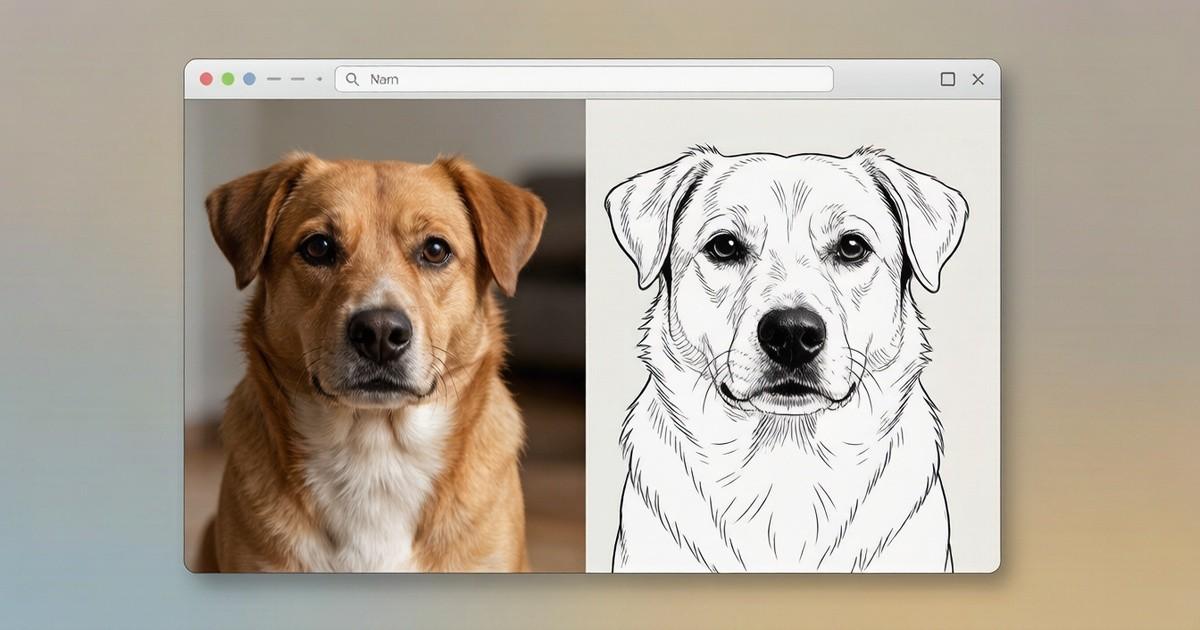
Learn how to convert photo to coloring page for free with PhotoColorify. No registration, fast results, and supports PNG, JPG, and WEBP. Try it now. Practical.
You have a favorite snapshot of your child laughing on a swing, or a beloved dog sitting by the window. You want to turn it into a coloring page for a rainy afternoon, but the thought of tracing every outline by hand feels exhausting. You open a generic image editor, try filters, and end up with a messy gray blob that no one wants to color. The solution is simpler than you think: use a dedicated tool that does the heavy lifting automatically. PhotoColorify lets you convert photo to coloring page without downloading software, without paying a cent, and without learning any design skills. In this guide, you will learn exactly how to do it, what to expect, and why this free web tool stands out for parents, teachers, and hobbyists.
Why a Dedicated Tool Beats Manual Tracing
Manual tracing requires patience, steady hands, and hours of free time. You also need to decide which lines matter, which shadows to ignore, and how to simplify complex backgrounds. A dedicated converter uses algorithms to detect edges and contrast, producing clean black-and-white line art that mimics professional coloring book illustrations. When you convert photo to coloring page with PhotoColorify, the process takes seconds, not hours. The tool analyzes your image, removes color, and keeps only the essential outlines. This is especially helpful for portraits, animals, and objects with clear shapes. You avoid the frustration of erasing smudges or redrawing crooked lines. Moreover, you can repeat the process as many times as you like with different photos, experimenting with contrast and detail levels until you get the exact look you want.
Preparing Your Image for the Best Result
Before you upload anything, check your photo quality. The tool works best with images where the subject stands out from the background. A close-up of a face, a single flower, or a car on a plain driveway will produce clearer lines than a busy street scene. The shorter side of your image should be at least 512 pixels. If your photo is smaller, the output may look pixelated or lack detail. Also, the tool supports PNG, JPG, and WEBP formats, so you do not need to convert your file to a special type first. Avoid heavily compressed images with visible artifacts. If your original photo is dark, consider brightening it slightly before uploading. High contrast between the subject and the background helps the algorithm find edges more accurately. Once you have selected your best shot, you are ready to move to the next step.
Step-by-Step: Convert Photo to Coloring Page in Under a Minute
Open your browser and go to photocolorify. You will see a simple upload button. Click it and choose your image file from your computer or phone. The tool does not require registration, so you can skip creating an account. After uploading, the system processes your image. Generation takes a few seconds to a minute, depending on the file size and complexity. You will see a preview of the black-and-white line art appear on your screen. If you like the result, download it. If not, you can adjust settings or try a different photo. The entire workflow is designed for speed and ease. No watermarks are added, and your results are saved for 24 hours, giving you time to download them later For readers comparing practical options, black and white coloring page from photo can provide relevant context. if you get distracted. This free service is 100% free, with no hidden fees or premium tiers. You can use it as often as you need for school projects, party activities, or personal relaxation.
Creative Uses for Your New Coloring Pages
Once you have your line art, the possibilities are endless. Teachers can create custom coloring pages for lessons about animals, historical figures, or geometric shapes. Parents can turn family photos into unique gifts for grandparents. Therapists and activity coordinators can use personalized pages for memory care sessions. You can also print the pages on cardstock and use them as placemats, greeting cards, or party favors. If you want to make a coloring book for a child who loves dinosaurs, simply upload several dino photos and convert each one. The consistent style across pages will make the book feel professional. Another idea: use the pages as a base for embroidery patterns or fabric painting stencils. Because the lines are clean and bold, they transfer well to fabric with a lightbox. The tool also works for adult coloring enthusiasts who prefer intricate designs. Just choose a photo with many details, like a lighthouse or a detailed car, and the output will have enough lines to keep you busy for an evening.
Comparing PhotoColorify with Other Methods
You might wonder why you should use this web tool instead of a mobile app or a desktop program. Many apps require a subscription or limit the number of free conversions per day. Desktop software often has a steep learning curve and may not run on older computers. PhotoColorify works entirely in your browser, so it is compatible with any device that has internet access. There is no registration required, which means no spam emails and no password to remember. The service is 100% free, so you never worry about hitting a paywall mid-project. Another advantage is the speed. While some manual methods take ten minutes per image, this tool finishes in under a minute for most files. The output quality is consistent because the algorithm is tuned specifically for coloring page generation, not general photo editing. If you have ever tried using a generic filter that turns your photo into a mess of gray dots, you will appreciate the difference. The tool For readers comparing practical options, photocolorify can provide relevant context. also respects your privacy; you do not need to create an account, and your uploaded files are not stored permanently. After 24 hours, they are removed from the server.
Tips for Getting the Cleanest Lines Every Time
To get the best possible result when you convert photo to coloring page, follow these practical tips. First, choose photos with a single main subject. A portrait with a plain wall behind it works better than a group photo at a busy park. Second, ensure good lighting. Photos taken in bright, even light have clearer edges than those shot in dim conditions. Third, avoid images with heavy texture, like fur or grass, unless you want a very busy page. For a simpler page, pick photos with smooth surfaces. Fourth, if your first attempt looks too detailed or too sparse, try a different photo or adjust the contrast in your original image before uploading. You can also crop the photo to focus on the most important part. For example, instead of a full-body shot of a cat, crop to just the face. This will give you larger, more defined lines. Finally, remember that the shorter side of your image should be at least 512 pixels. If you are unsure about the pixel size, most phone photos are much larger than that, so you are likely fine. After you download your page, you can print it on standard letter paper or A4. Use a laser printer for the darkest lines, or adjust your For readers comparing practical options, create coloring page from picture can provide relevant context. inkjet settings to high quality.
Why Free and No-Registration Matters for Casual Users
Many online tools lure you in with a free trial and then ask for your credit card. Others force you to create an account and then send you promotional emails for months. PhotoColorify avoids all that. The service is 100% free, and no registration is required. You simply upload, wait a few seconds, and download. This is ideal for someone who needs a coloring page for a birthday party tomorrow or a Sunday school class in an hour. You do not want to spend twenty minutes signing up and verifying your email. You also do not want to worry about your credit card being charged after a trial period. The tool respects your time and your privacy. Your results are saved for 24 hours, which is enough time to download them to your device. After that, the files are deleted from the server. This means you can use the tool on a public computer or a friend's laptop without leaving your personal photos behind. The simplicity is the core feature. You do not need to read a manual or watch a tutorial. The interface is straightforward, and the output is ready to print.
Final Thoughts on Making Custom Coloring Pages
Turning your favorite photos into coloring pages opens up a world of creative projects. Whether you are a teacher preparing a lesson, a parent making a rainy-day activity, or an adult looking for a mindful hobby, the ability to convert photo to coloring page in seconds is a major change for your craft time. the service makes this process accessible to everyone, regardless of technical skill. You do not need to install software, learn complex tools, or pay for expensive apps. Just visit the website, upload your image, and within a minute you have a printable page. The tool supports PNG, JPG, and WEBP, and it works with images that have a shorter side of at least 512 pixels. The service is 100% free, with no registration required, and your results are saved for 24 hours. So next time you see a beautiful sunset, a funny pet pose, or a child's proud smile, do not just keep it in your camera roll. Turn it into a coloring page and enjoy the process of bringing it to life with crayons or markers. The only limit is your imagination. Start with one photo today, and you will quickly see how easy and satisfying it is to create personalized art for yourself or someone you love.

 English
 Arabic
 French
 Spanish
 Portuguese
 Deutsch
 Turkish
 Dutch
Dutch
 Italiano
 Russian
 Portuguese (Brazil)
 Greek
Greek
