


Why Does a Wireless Mic Sound Clear on a Phone but Noisy on a Camera? (Pakistan Troubleshooting Guide)
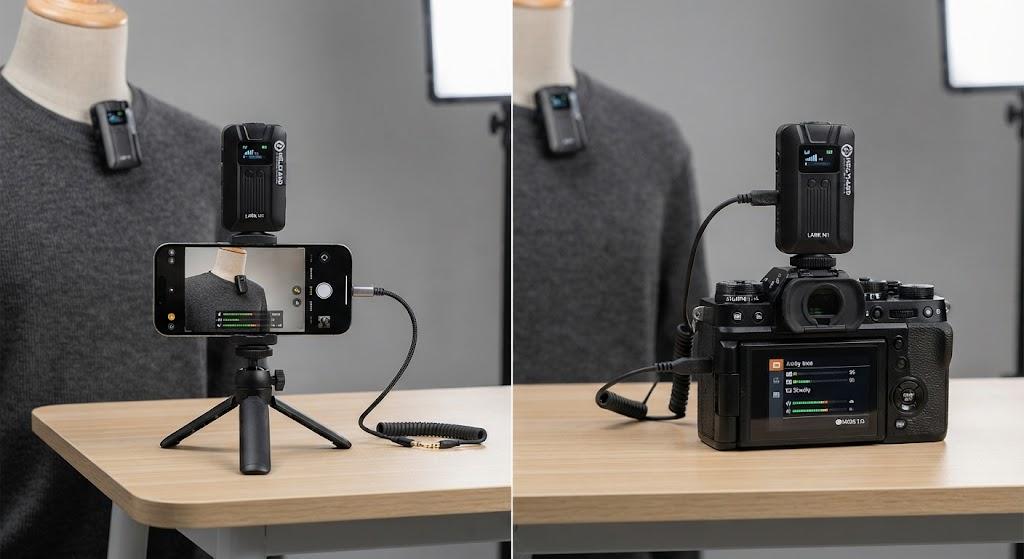
If your wireless mic sounds clean on your phone but noticeably hissy or noisy on your camera, the mic itself almost certainly isn't the problem — the gain staging between the receiver and the recording device is. Phones and cameras handle incoming audio signals very differently, and a receiver set up correctly for one will often sound wrong on the other unless you adjust for it.
This is one of the most common questions we get in-store from vloggers and YouTubers who bought a wireless mic, tested it on their phone, loved it, then plugged the same receiver into their camera and heard a faint hiss or background noise that wasn't there before. As an authorized distributor of wireless mic systems in Pakistan, we see this exact issue daily, and it's fixable in most cases without buying new gear.
The Real Reason: Output Level Mismatch, Not Mic Quality
Most wireless mic receivers, including popular models from Hollyland and similar brands, output audio at different signal levels depending on which "mode" they're set to. Phones typically expect a lower, mic-level signal, while cameras can expect either mic-level or line-level input depending on the model.
When a receiver outputs a stronger line-level signal into a camera's mic-level input, the camera's preamp doesn't get a chance to properly amplify a clean, matched signal — it either overdrives slightly or the recording ends up sounding thin, with more audible noise floor than expected.
Real scenario: A Lahore-based YouTuber tested his Hollyland Lark receiver on his iPhone and it sounded broadcast-quality. He then plugged the same receiver into his Sony camera using a 3.5mm cable and heard a constant faint hiss under his voice. The receiver was still set to "phone" output mode, which sends a different signal level than the "camera" mode most receivers include as a switchable setting.
Check the Receiver's Output Mode First
This is the single most important troubleshooting step, and it solves the issue more often than any other fix.
-
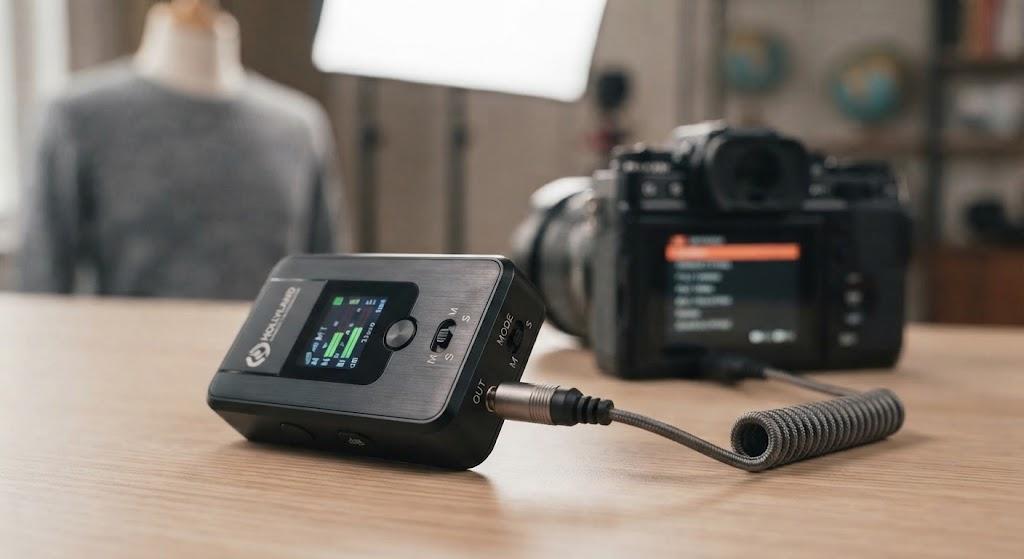
Most modern wireless mic receivers (Hollyland Lark series, DJI Mic, Ulanzi wireless kits) have a small switch or menu setting for "Phone / Camera / PC" output mode.
-
Phone mode is typically tuned for the lower input levels smartphones expect.
-
Camera mode adjusts the output level to better match a camera's mic input, reducing the gain the camera has to add — and less added gain means less amplified noise.
-
If your receiver has no visible switch, check the companion app; some brands hide this setting in software rather than hardware.
Switching from phone mode to camera mode, without changing anything else, resolves this exact complaint in the majority of cases we've seen.
Why Cameras Are More Sensitive to Gain Than Phones
Smartphones use dedicated, well-shielded audio processing chips tuned specifically for their built-in and external mic inputs, with aggressive digital noise reduction applied automatically. Cameras, especially entry-level DSLRs and mirrorless bodies, use simpler analog preamps that weren't primarily designed for external mic input quality — audio is often a secondary feature to imaging.
This means a camera's mic input has to work harder to boost a quiet incoming signal, and boosting gain always boosts the noise floor along with the voice.
Real scenario: A Karachi-based product reviewer used the same wireless mic on two different cameras — his older entry-level DSLR and a newer mirrorless body. The DSLR recording had noticeably more hiss at the same manual gain setting, simply because its internal preamp had a higher noise floor to begin with, regardless of the mic connected to it.
Camera Preamp Quality Varies More Than People Expect
|
Camera Tier |
Typical Mic Preamp Quality |
Manual Gain Control |
Noise Floor Risk |
|
Entry-level DSLR/Mirrorless |
Basic, often auto-gain only |
Limited or none |
Higher — needs external boost more often |
|
Mid-range Mirrorless (enthusiast) |
Improved preamp, manual gain available |
Yes, usually |
Moderate |
|
Professional Cinema Cameras |
Dedicated audio circuitry, XLR inputs available |
Full manual control |
Lower — cleaner signal path |
If you're consistently fighting noise on an entry-level camera body, the camera's internal audio hardware may genuinely be the limiting factor, not your mic or your settings. In that case, recording audio separately on the receiver itself (many wireless systems include onboard recording) and syncing it in editing often gives a cleaner result than relying on the camera's mic input at all.
Check Your Cable and Connector Type
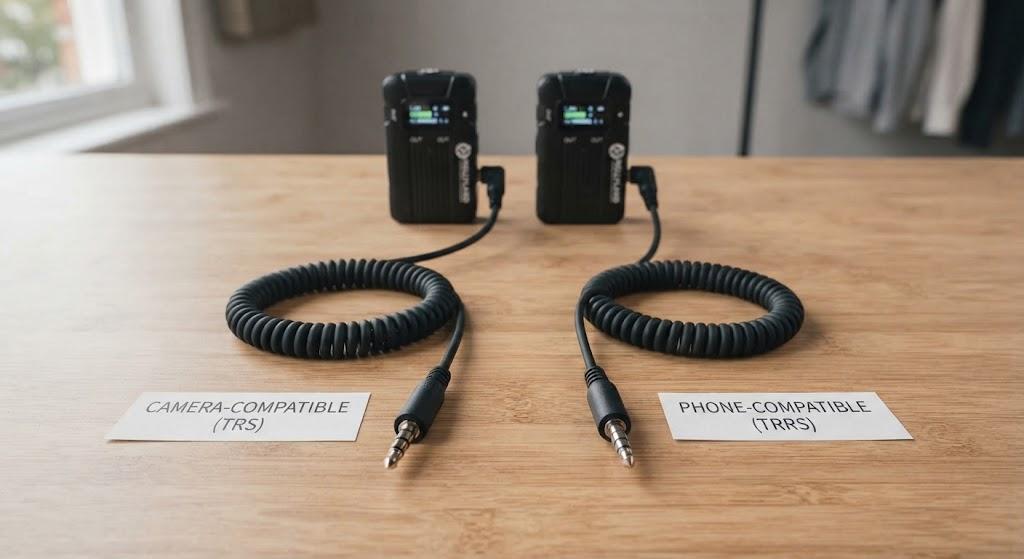
A less common but real cause of noise: using the wrong 3.5mm cable type. TRS (two-ring) and TRRS (three-ring) cables carry audio signals differently, and mixing them up with the wrong adapter can introduce hum, noise, or an unbalanced signal.
-
Phones typically use TRRS connections (mic and headphone combined).
-
Camera mic inputs are usually TRS-only.
-
Using a cable or adapter designed for the wrong standard can cause exactly the kind of background hiss or hum described in this article, even when the output mode is set correctly.
Always confirm the cable that came with your receiver is the TRS variant if you're connecting to a camera, not the TRRS cable meant for phones.
Manual Gain vs Auto Gain: What Actually Helps
Many cameras default to Automatic Gain Control (AGC), which constantly adjusts input sensitivity based on ambient sound. This is convenient but often the direct cause of audible "pumping" noise or hiss during quiet moments, since AGC boosts gain aggressively when it detects silence.
|
Setting |
Behavior |
Noise Impact |
|
Auto Gain Control (AGC) |
Camera adjusts sensitivity automatically in real time |
Often increases noise during quiet pauses |
|
Manual Gain (fixed level) |
You set and lock the gain level yourself |
Generally cleaner and more predictable |
If your camera supports manual audio gain, switching off AGC and setting a fixed level — testing at your normal speaking volume and adjusting until the signal peaks around -12dB to -6dB — usually produces a noticeably cleaner result than leaving it on auto.
The Bottom Line
A wireless mic that sounds clean on your phone but noisy on your camera almost always points to a gain or output-level mismatch, not a defective microphone. Check your receiver's output mode first (switch it to "camera" if available), confirm you're using a TRS cable for the camera connection, and switch off Auto Gain Control in favor of a manually set level. If the hiss persists after all three checks, the camera's internal preamp quality may be the real limiting factor, in which case recording audio directly on the receiver and syncing it later will give you a cleaner result than the camera's mic input alone.
Frequently Asked Questions
1. Is my wireless mic broken if it sounds noisy only on my camera? Almost certainly not. If the same mic sounds clean on your phone, the hardware is working correctly — the issue is nearly always a mismatch in output mode, gain settings, or cable type between the receiver and your camera.
2. What does "camera mode" on a wireless mic receiver actually change? It adjusts the output signal level to better match what a camera's mic input expects, reducing how much additional gain the camera needs to apply. Less added gain generally means a lower audible noise floor in your recording.
3. Should I turn off Auto Gain Control (AGC) on my camera for wireless mic recording? In most cases, yes. AGC tends to boost sensitivity aggressively during quiet moments, which raises background hiss. Manual gain, set once at your normal speaking level, is usually more consistent and cleaner.
4. Can a cheap 3.5mm cable really cause audio noise? Yes. Using a TRRS (phone-style) cable on a camera's TRS-only mic input, or a poorly shielded cable, can introduce hum or noise even when every other setting is correct. Always use the cable type matched to your recording device.
5. Why does my entry-level camera sound noisier than my friend's camera with the exact same wireless mic? Camera mic preamp quality varies significantly between entry-level and higher-tier bodies. If the settings and cable are identical, a camera with a more basic internal audio circuit will typically show more noise at the same gain level than a camera with better-designed audio hardware.

 English
 Arabic
 French
 Portuguese
 Deutsch
 Turkish
 Dutch
Dutch
 Italiano
 Russian
 Romaian
 Portuguese (Brazil)
 Greek
Greek
