


Why Internal Laptop Components Can Become Sensitive to Temperature Changes
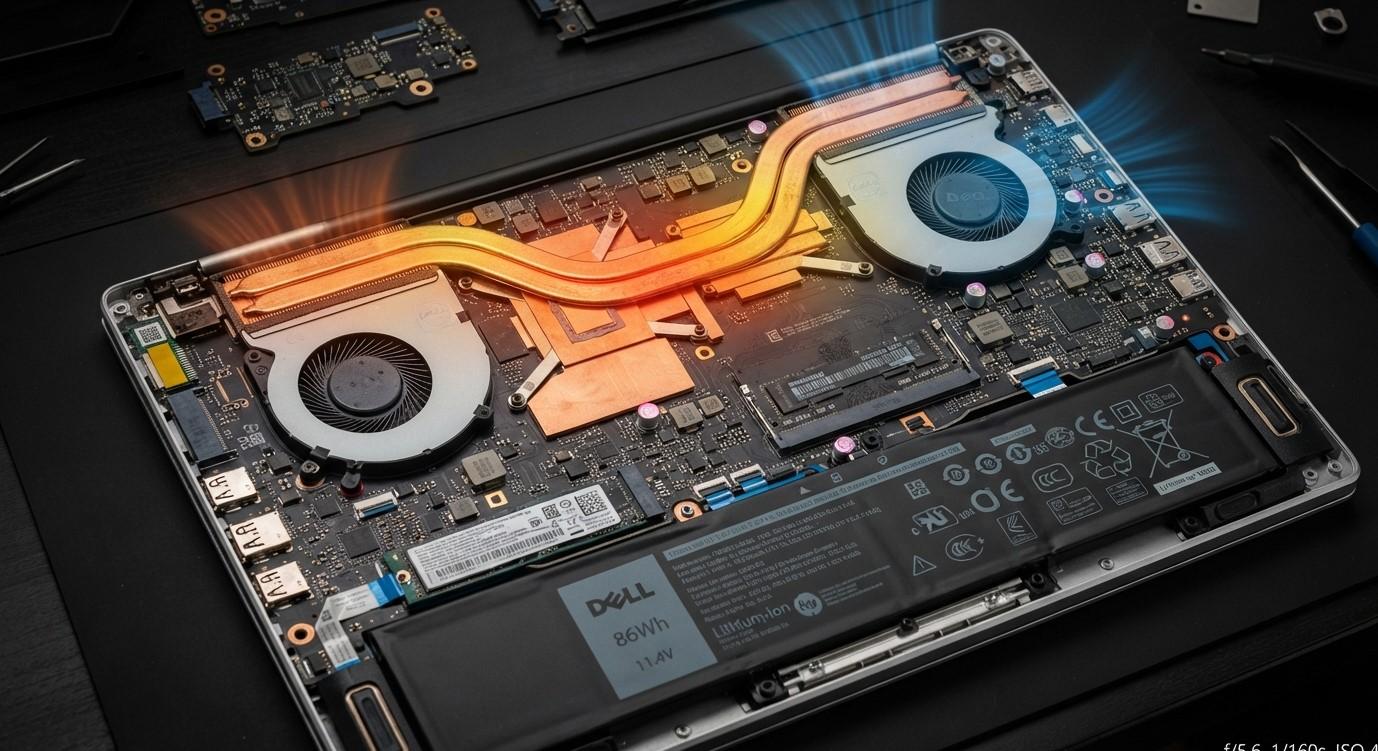
Laptop components are designed to operate across a practical range of temperatures, but repeated exposure to heating and cooling can gradually affect their stability. Everyday activities such as browsing, video calls, gaming, charging, and multitasking generate heat inside the device. When the laptop repeatedly moves between warmer and cooler conditions, internal components and connections can experience physical and electrical stress. Understanding laptop thermal sensitivity can help users recognize why a system may become less reliable under changing temperatures. At iPC Repair Houston, technicians can inspect cooling systems and internal hardware when temperature-related problems develop. If temperature-related symptoms also affect the display, laptop screen repair Houston can help determine whether the issue involves the panel, display cable, connector, or another component. Customers searching for screen repair Houston TX can also request a broader hardware evaluation.
Why Temperature Changes Affect Laptop Hardware
Electronic components operate within specific temperature ranges.
During normal use, heat is generated by components such as:
- Processor
- Graphics hardware
- Memory
- Storage
- Power circuitry
- Battery
The cooling system removes much of this heat. However, the internal temperature naturally changes as workloads increase or decrease.
For example, a laptop may remain relatively cool while browsing and become significantly warmer during demanding applications.
Repeated changes between these conditions can gradually affect hardware reliability.
Thermal Expansion and Contraction
One important reason temperature changes matter is that materials expand when heated and contract when cooled.
Laptop components are made from different materials, including metals, plastics, silicon, and other substances. These materials can respond differently to temperature changes.
Over many heating and cooling cycles, repeated expansion and contraction can place mechanical stress on:
- Circuit boards
- Solder connections
- Connectors
- Cables
- Component interfaces
This does not mean every temperature change causes damage, but repeated thermal cycling can contribute to long-term wear.
Solder Connections Can Experience Stress
The motherboard contains numerous soldered connections that electrically connect components to the circuit board.
Repeated thermal cycling can place mechanical stress on these tiny connections.
If a connection becomes weakened, the laptop may eventually experience intermittent symptoms such as:
- Random restarts
- Hardware detection problems
- Charging interruptions
- Display instability
- Failure to start
These symptoms may appear occasionally at first, making them difficult to identify.
Cooling Problems Can Increase Temperature Sensitivity
A healthy cooling system helps keep temperature changes within a manageable range.
However, dust buildup, aging fans, blocked vents, or deteriorated thermal material can reduce cooling efficiency.
When this happens, components may experience higher temperatures and larger temperature fluctuations.
Common warning signs include:
- Loud fans
- Excessive heat
- Performance throttling
- Unexpected shutdowns
- Slow response
- Frequent thermal warnings
Maintaining proper airflow is therefore important for long-term hardware stability.
Battery Performance Can Change With Temperature
Laptop batteries can also be sensitive to temperature conditions.
Extreme heat can increase battery stress, while very cold conditions can temporarily affect battery performance.
Users may notice:
- Faster battery drain
- Unexpected percentage changes
- Reduced operating time
- Charging interruptions
If unusual battery behavior continues under normal conditions, the battery and charging system should be professionally evaluated.
Storage Devices Can Be Affected by Heat
Storage devices also operate within specific environmental limits.
Long-term exposure to excessive temperatures may contribute to additional stress on storage hardware.
Potential warning signs include:
- Slower file access
- Application crashes
- Startup delays
- File errors
- System freezing
Because storage problems can lead to data loss, users should maintain current backups and investigate recurring storage symptoms promptly.
Display Hardware May Respond to Temperature Changes
Laptop displays contain several components that can be affected by physical and electrical conditions.
Temperature-related stress may sometimes contribute to symptoms such as:
- Screen flickering
- Temporary image loss
- Brightness changes
- Lines across the display
- Intermittent black screens
However, these symptoms can have many possible causes, including panel defects, damaged cables, loose connectors, graphics problems, or motherboard issues.
For laptop screen repair Houston, technicians can inspect the complete display assembly and related hardware to determine the source of the problem. Customers looking for screen repair Houston TX can also request a broader diagnostic when display issues appear alongside temperature-related symptoms.
Rapid Temperature Changes Can Be More Challenging
A gradual change in operating temperature is generally easier for hardware to accommodate than a sudden extreme change.
For example, moving a laptop repeatedly between a very hot environment and a significantly cooler one can expose components to rapid thermal changes.
Users should avoid unnecessary exposure to extreme environmental conditions whenever possible.
How to Reduce Temperature-Related Hardware Stress
Several habits can help maintain more stable internal temperatures.
Keep Air Vents Clear
Blocked vents can prevent heat from escaping effectively.
Use the Laptop on Hard Surfaces
Soft surfaces can restrict airflow and increase operating temperatures.
Keep Internal Dust Under Control
Professional cleaning can remove dust that accumulates around fans and heat sinks.
Avoid Extreme Temperatures
Do not leave laptops in very hot vehicles or extremely cold environments for extended periods.
Monitor Unusual Heating
If a laptop becomes unusually hot during simple tasks, investigate the cause rather than ignoring it.
Warning Signs That Need Attention
Temperature-related hardware problems may become more noticeable when users experience:
- Frequent overheating
- Unexpected shutdowns
- Random restarts
- Screen flickering
- Charging problems
- Loud fans
- Performance drops
- Hardware detection errors
Recording when these symptoms occur can help technicians identify whether temperature is a contributing factor.
Why Professional Inspection Helps
Temperature-related hardware problems can involve several systems simultaneously.
At iPC Repair Houston, technicians can inspect cooling performance, fans, thermal materials, battery health, power delivery, display connections, storage, and other internal components.
Professional laptop thermal sensitivity assessment can help determine whether symptoms are caused by cooling problems, component aging, connection issues, or another hardware fault.
Conclusion
Internal laptop components can become increasingly sensitive to temperature changes because of repeated thermal cycles, aging materials, cooling-system deterioration, and long-term heat exposure. Expansion and contraction can place stress on circuit boards, solder connections, cables, and connectors, while excessive temperatures can affect batteries, storage, and other components. Understanding laptop thermal sensitivity can help users recognize early warning signs and reduce unnecessary hardware stress. If temperature-related problems are accompanied by display symptoms, laptop screen repair Houston services can help determine whether the issue involves the screen, cable, connector, graphics hardware, or motherboard. Customers searching for screen repair Houston TX can also request a complete hardware inspection. With proper ventilation, careful handling, regular maintenance, and professional diagnostics from iPC Repair Houston, users can help maintain more stable laptop performance despite normal temperature changes.

 English
 Arabic
 French
 Portuguese
 Deutsch
 Turkish
 Dutch
Dutch
 Italiano
 Russian
 Romaian
 Portuguese (Brazil)
 Greek
Greek
