


How Inventory Management Software Helps Businesses Reduce Waste and Improve Efficiency
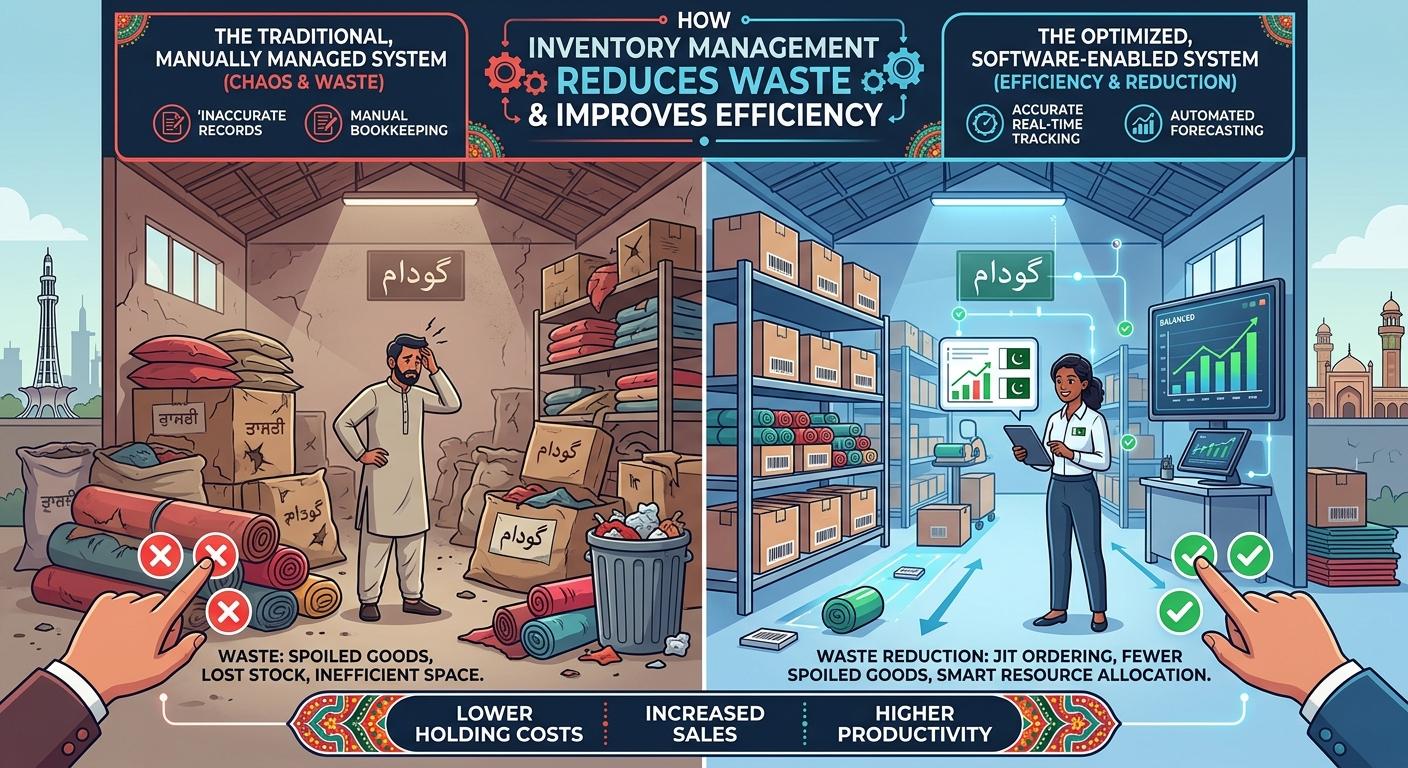
Managing inventory efficiently is essential for businesses that sell products, manufacture goods, or operate warehouses. Without an organized system, companies may struggle with stock shortages, excess inventory, inaccurate records, delayed orders, and unnecessary operating costs. These challenges can affect customer satisfaction and limit business growth.
Inventory management software helps businesses monitor stock levels, track product movement, automate routine tasks, and make better purchasing decisions. Instead of relying on spreadsheets and manual recordkeeping, organizations can use digital tools to maintain accurate inventory information and improve coordination across departments.
For businesses with unique workflows or complex inventory requirements, investing in custom software development services can provide a more flexible approach to inventory control. A tailored solution can connect inventory operations with sales, purchasing, accounting, and other business systems.
In this guide, we explore how inventory management software works, its key benefits, and how businesses can choose the right solution for their needs.
What Is Inventory Management Software?
Inventory management software is a digital system that helps businesses track and control the products and materials they store, purchase, manufacture, or sell.
Depending on its features, the software can help organizations:
-
Monitor available stock in real time.
-
Track products across multiple warehouses.
-
Record incoming and outgoing inventory.
-
Manage purchase orders and supplier information.
-
Identify low-stock items and prevent shortages.
-
Track product batches, serial numbers, or expiration dates.
-
Generate reports about stock movement and inventory costs.
For example, an online retailer can use inventory software to update stock automatically when an order is placed. A manufacturer can use it to monitor raw materials and determine when additional supplies are needed.
The right system gives decision-makers a clearer understanding of inventory levels and helps them avoid costly errors.
Why Businesses Need Better Inventory Management
Inventory problems can affect nearly every part of an organization. Even small errors may lead to financial losses when they happen repeatedly.
1. Preventing Overstocking
Overstocking occurs when a business purchases more products than it can sell or use within a reasonable period. Excess stock occupies storage space, increases carrying costs, and ties up money that could support other activities.
Inventory management software helps businesses review sales patterns, monitor stock levels, and establish reorder limits. These insights support more informed purchasing decisions.
2. Avoiding Stockouts
Stockouts happen when customers want to purchase a product that is unavailable. Repeated shortages can cause missed sales and damage customer trust.
Automated alerts can notify employees when inventory falls below a defined threshold. Businesses can then reorder products before stock runs out.
3. Reducing Manual Errors
Manual inventory tracking often involves spreadsheets, paper records, and repeated data entry. These methods can create inconsistencies when several employees update the same information.
A centralized digital system reduces repetitive entry and helps teams work from a consistent inventory record.
4. Improving Order Fulfillment
Accurate stock information allows employees to locate products, prepare orders, and communicate realistic delivery expectations. Better coordination between sales and warehouse teams can reduce delays and improve the customer experience.
Key Benefits of Inventory Management Software
Real-Time Inventory Visibility
A modern inventory system can display current stock levels as products are received, transferred, sold, or returned.
When inventory data updates promptly, managers can identify shortages, review available quantities, and coordinate stock between locations. This is especially valuable for businesses operating several warehouses or retail outlets.
Organizations that need a connected digital environment may also benefit from custom software development solutions designed around their existing operations.
Automated Reordering
Reordering inventory manually requires employees to review stock records and decide when to purchase more products. This process can become difficult as product catalogs expand.
Inventory software can generate reorder alerts based on minimum stock levels, demand patterns, and supplier lead times. More advanced systems may use historical sales data to help forecast future requirements.
Automation does not eliminate the need for human judgment, but it gives purchasing teams better information when making decisions.
Improved Warehouse Organization
Warehouse employees need to know where products are stored and how quickly they can be retrieved. Poor organization can increase picking time and lead to shipping mistakes.
Inventory software can support warehouse location tracking, barcode scanning, stock transfers, and picking workflows. Businesses can use these features to improve product handling and make better use of storage space.
Better Supplier Coordination
Supplier delays can disrupt production and order fulfillment. An inventory management system can maintain supplier details, purchase histories, lead times, and order statuses in one place.
With this information, purchasing teams can compare supplier performance, identify recurring delays, and plan replenishment more effectively.
More Accurate Business Reporting
Inventory reports can help businesses understand which products sell quickly, which remain in storage, and where losses may be occurring.
Useful reports may include:
-
Stock movement and turnover.
-
Inventory valuation.
-
Slow-moving and obsolete products.
-
Purchase order status.
-
Product demand by season.
-
Stock discrepancies and adjustments.
These reports help managers make decisions based on operational data rather than assumptions.
Custom Inventory Software vs. Ready-Made Solutions
Not every business requires a fully customized inventory platform. The right choice depends on the organization's size, budget, workflows, and integration requirements.
| Factor | Ready-made software | Custom inventory software |
|---|---|---|
| Initial cost | Often lower | Usually higher |
| Setup | Generally faster | Requires planning and development |
| Features | Based on the vendor's package | Designed around business requirements |
| Integrations | Depends on available connectors | Can be planned for specific systems |
| Scalability | Depends on product limits and pricing | Can evolve with changing requirements |
| Maintenance | Often handled partly by the vendor | Requires an agreed support and maintenance plan |
Ready-made software may suit businesses with standard inventory processes and limited customization needs.
Custom development may be more appropriate for companies with specialized warehouse operations, complex product configurations, multiple business systems, or industry-specific requirements.
A reliable custom software development company can help evaluate these requirements before development begins.
Essential Features to Include in an Inventory Management System
Before building or purchasing a system, businesses should identify the features that solve their most important operational problems.
Stock Tracking and Product Catalogs
The software should maintain accurate product records, including product codes, descriptions, categories, quantities, and storage locations. Barcode or QR-code scanning can simplify stock updates and reduce manual entry.
Purchase and Sales Order Management
Connecting inventory with purchase and sales orders helps teams track products from procurement through delivery. The system should clearly show pending orders, received goods, reserved stock, and completed transactions.
Multi-Warehouse Support
Businesses with several locations need a reliable way to monitor inventory across warehouses, branches, and distribution centers. Transfer records help teams understand where stock is located and prevent duplicate or inaccurate counts.
Role-Based Access
Not every employee needs permission to change every inventory record. Role-based access allows businesses to define who can view stock, approve purchases, adjust quantities, or access financial reports.
Notifications and Alerts
Automated notifications can flag low inventory, delayed purchase orders, unusual stock changes, or approaching expiration dates. Alerts should be relevant and configurable so employees can focus on issues requiring action.
Reporting and Analytics
Reporting tools should provide practical information about inventory performance. Clear dashboards can help managers identify trends and make purchasing, storage, and pricing decisions.
How Inventory Software Connects With Other Business Systems
Inventory management becomes more effective when it works with the rest of the business technology environment.
Integration With Accounting Software
Connecting inventory and accounting systems helps maintain consistency between stock transactions and financial records. It can also simplify inventory valuation and reconciliation, depending on the accounting setup.
Integration With E-Commerce Platforms
Online stores need accurate stock information to prevent customers from ordering unavailable products. Integration can synchronize product quantities, order details, returns, and fulfillment updates.
Businesses that need customer-facing online systems may explore best web application development services to create connected platforms suited to their workflows.
Integration With CRM Systems
Customer relationship management software stores information about customers, sales activities, and purchase histories. When connected with inventory data, sales teams can make better-informed commitments and coordinate product availability with customer demand.
Integration With Mobile Applications
Warehouse employees may need to scan products, update quantities, or confirm transfers while moving around a facility. A mobile interface can make these tasks faster than returning to a desktop workstation.
Businesses planning mobile tools can review mobile application development services when considering how to support inventory operations away from a desk.
How to Implement Inventory Management Software Successfully
Choosing software is only one part of improving inventory operations. A structured implementation process helps ensure the system addresses actual business needs.
Step 1: Review Current Inventory Processes
Identify how inventory is currently recorded, how orders are processed, and where errors occur. Speak with warehouse employees, purchasing teams, sales representatives, and finance staff to understand their requirements.
Step 2: Define Clear Objectives
Set measurable goals before selecting or developing a solution. For example, a business may aim to reduce stock discrepancies, improve order fulfillment time, or lower the amount of slow-moving inventory.
Step 3: Clean Existing Inventory Data
Outdated product records and inconsistent stock counts can undermine a new system. Review product codes, quantities, supplier details, and warehouse locations before transferring data.
Step 4: Select the Right Technology
Compare available solutions against your requirements, integration needs, security expectations, budget, and future growth plans.
If existing platforms cannot support essential workflows, consider custom software development consulting to evaluate a tailored approach.
Step 5: Test Before Full Deployment
Start with a pilot involving a limited product range, warehouse, or business unit. Test receiving, stock adjustments, order processing, reporting, and integrations before expanding to all operations.
Step 6: Train Employees
Provide practical training based on employees' daily responsibilities. Clear procedures help staff record stock movements consistently and reduce resistance to the new system.
Step 7: Measure and Improve
Review system performance after launch. Gather employee feedback, monitor inventory accuracy, and adjust workflows as business requirements change.
Common Inventory Management Mistakes to Avoid
Even good software cannot solve every problem automatically. Businesses should avoid these common mistakes:
Ignoring data quality: Incorrect opening stock balances or duplicate product records can create unreliable reports.
Choosing unnecessary features: A complicated system may increase costs and make everyday tasks harder. Prioritize features that solve real operational problems.
Overlooking integrations: Separate systems can create duplicate records and manual work if they do not exchange information properly.
Neglecting employee training: Staff need to understand how and when to record stock movements, returns, and adjustments.
Failing to monitor performance: Without regular reviews, businesses may not notice recurring stock discrepancies or inefficient workflows.
Underestimating security: Inventory data can reveal valuable commercial information. Use appropriate access controls, backups, secure integrations, and monitoring.
How to Measure Inventory Management Performance
Businesses should evaluate whether their inventory system is producing measurable improvements.
| Metric | What it measures | Why it matters |
|---|---|---|
| Inventory accuracy | How closely recorded stock matches physical stock | Highlights discrepancies |
| Stockout rate | How often products are unavailable when needed | Indicates replenishment problems |
| Inventory turnover | How frequently inventory is sold or used during a period | Helps evaluate stock efficiency |
| Order fulfillment time | Time required to process and fulfill orders | Measures operational speed |
| Carrying cost | Cost of storing and maintaining inventory | Reveals the financial impact of excess stock |
| Order accuracy | Percentage of orders fulfilled correctly | Helps track picking and shipping quality |
Establish a baseline before implementation and compare results over time. Targets should reflect the business model, product type, supplier reliability, and customer expectations.
How UnTitleTech Can Support Business Software Development
Every business has different inventory workflows, reporting needs, and integration challenges. Some companies can achieve their goals with an existing platform, while others need a solution designed around their specific processes.
UnTitleTech helps businesses explore digital solutions through its software development services. Depending on the project requirements, this may involve planning a custom inventory platform, connecting business applications, developing a web-based dashboard, or building mobile tools for operational teams.
Explore UnTitleTech to learn more about its services and identify an approach that fits your business goals.
Frequently Asked Questions
1. What is the main purpose of inventory management software?
Its main purpose is to help businesses track stock, manage replenishment, organize warehouse activities, and maintain accurate inventory records.
2. Is inventory management software suitable for small businesses?
Yes. Small businesses can use inventory software to reduce manual recordkeeping, monitor stock levels, and improve order accuracy. The solution should match their current needs and expected growth.
3. Can inventory software integrate with an online store?
Many inventory systems can integrate with e-commerce platforms. Integration capabilities vary, so businesses should verify support for their particular store, order process, and accounting system.
4. When should a business consider custom inventory software?
Custom software may be worth evaluating when a business has specialized workflows, complex integrations, multiple warehouse locations, or requirements that existing products cannot meet effectively.
5. How long does inventory software implementation take?
The timeline depends on the solution's complexity, data quality, integration requirements, number of locations, and training needs. A basic implementation may be relatively quick, while a customized multi-system project can require significantly more time.
6. Is inventory management software secure?
Security depends on how the system is designed, configured, and maintained. Businesses should consider authentication, role-based permissions, encrypted connections, backups, audit logs, and timely security updates.
Conclusion
Inventory management software helps businesses improve stock visibility, reduce manual errors, streamline warehouse operations, and make more informed purchasing decisions. By connecting inventory data with sales, accounting, and other business systems, organizations can build more consistent and efficient workflows.
The best solution is not necessarily the one with the most features. It is the one that addresses the company's actual challenges, integrates with existing processes, and can support future requirements.
Businesses should begin by identifying inventory problems, setting measurable goals, and evaluating available technology. When standard tools cannot meet important requirements, a tailored solution may offer greater flexibility.
With the right planning and implementation strategy, inventory management software can become a valuable part of a company's long-term operational improvement and growth.

 English
 Arabic
 Spanish
 Portuguese
 Deutsch
 Turkish
 Dutch
Dutch
 Italiano
 Russian
 Romaian
 Portuguese (Brazil)
 Greek
Greek
