


What Is a Barcode Sticker Printer and How Can It Improve Your Business?
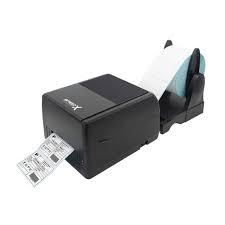
In today's competitive business environment, accurate product labeling and efficient inventory management are essential for success. Whether you run a retail store, warehouse, supermarket, pharmacy, manufacturing company, or e-commerce business, barcode stickers help you identify and manage products easily. A barcode sticker printer is a useful device that allows businesses to print professional barcode stickers for products, packaging, shipping, inventory, and other applications.
Unlike traditional printing methods, barcode sticker printers are designed to produce clear, accurate, and scannable labels. They help businesses save time, reduce manual errors, and improve daily operations. In this blog, we will explore what a barcode sticker printer is, how it works, its benefits, types, applications, and how to choose the right one.
What Is a Barcode Sticker Printer?
A barcode sticker printer is a specialized printing machine used to create barcode stickers and product labels. It prints barcodes, product names, prices, serial numbers, QR codes, and other important information on adhesive label rolls.
These stickers can be attached to products, cartons, shelves, packages, and inventory items. Employees can scan the printed barcodes using barcode scanners to retrieve product information quickly.
Barcode sticker printers are commonly used in retail stores, warehouses, factories, distribution centers, hospitals, and logistics companies. They are available in different models, sizes, and printing technologies to meet different business requirements.
How Does a Barcode Sticker Printer Work?
A barcode sticker printer works by converting digital information into printed labels. The user first enters product details into compatible barcode software. This information may include product names, prices, identification numbers, and barcode numbers.
The software generates a barcode design and sends printing instructions to the machine. Depending on the printer technology, the device uses heat or ink-based printing to create the sticker.
Once printed, the barcode sticker can be attached to the product or package. A barcode scanner can then read the information encoded in the barcode and transfer it to a connected computer or inventory management system.
What Are the Different Types of Barcode Sticker Printers?
Choosing the right printer depends on your business needs, printing volume, and label requirements. Here are some popular types.
1. Direct Thermal Barcode Sticker Printer
Direct thermal printers use heat-sensitive sticker material to produce text and barcodes. They do not require ink, toner, or ribbons.
These printers are suitable for temporary labeling applications, including shipping stickers, delivery labels, and short-term product identification.
Key benefits:
- Easy to operate.
- Low maintenance requirements.
- No ribbon or ink required.
- Suitable for everyday label printing.
2. Thermal Transfer Barcode Sticker Printer
Thermal transfer printers use a heated printhead and ribbon to transfer ink onto sticker materials. They produce durable labels that can withstand handling and environmental conditions.
These printers are commonly used in manufacturing, warehouses, healthcare facilities, and industrial environments.
Key benefits:
- Durable and long-lasting labels.
- Clear barcode printing.
- Supports different label materials.
- Suitable for professional labeling applications.
3. Desktop Barcode Sticker Printer
Desktop barcode sticker printers are compact machines designed for small and medium-sized businesses. They are ideal for retail shops, offices, pharmacies, and small warehouses.
Their space-saving design makes them convenient for businesses with moderate printing requirements.
4. Industrial Barcode Sticker Printer
Industrial barcode sticker printers are designed for high-volume printing operations. They feature durable construction, faster printing capabilities, and reliable performance.
They are suitable for factories, distribution centers, logistics companies, and large warehouses.
5. Portable Barcode Sticker Printer
Portable barcode sticker printers are lightweight devices that allow users to print labels while working in different locations.
They are useful for warehouse employees, delivery professionals, retail workers, and field service teams.
Why Is a Barcode Sticker Printer Important for Businesses?
Barcode sticker printers offer several benefits that help businesses improve efficiency and organization.
1. Improves Product Identification
Barcode stickers make it easier to identify products. Employees can scan labels to access product details, prices, and identification numbers without manually searching through records.
2. Saves Time and Increases Productivity
Printing barcode stickers is faster than manually writing product information. Employees can label products quickly, prepare orders efficiently, and organize inventory with less effort.
3. Reduces Human Errors
Manual labeling can result in incorrect product numbers, prices, and descriptions. Barcode sticker printers help maintain consistent and accurate product information.
4. Makes Inventory Management Easier
Businesses can attach barcode stickers to inventory items and scan them during stock counting, receiving, and dispatching. This helps maintain accurate inventory records.
5. Improves Packaging and Shipping
Barcode stickers help identify packages, organize shipments, and track deliveries. They also support efficient order processing in e-commerce and logistics businesses.
6. Creates Professional Product Labels
Clear and attractive barcode stickers improve product presentation. Businesses can include product names, prices, company details, and other important information on their labels.
Where Are Barcode Sticker Printers Commonly Used?
Barcode sticker printers are useful across different industries.
- Retail Stores: Printing product labels, price stickers, and inventory tags.
- Supermarkets: Labeling products, shelves, and packaged goods.
- Warehouses: Identifying stock, storage locations, and packages.
- Manufacturing: Tracking raw materials, components, and finished products.
- Pharmacies: Printing medicine identification and inventory labels.
- Healthcare: Labeling medical supplies, samples, and equipment.
- E-commerce: Creating shipping labels and product identification stickers.
- Logistics: Tracking parcels, packages, and deliveries.
These applications show how barcode sticker printers help businesses maintain organized and efficient operations.
What Features Should You Consider Before Buying a Barcode Sticker Printer?
Before purchasing a barcode sticker printer, consider the following important features:
- Print Resolution: Choose a suitable resolution to ensure barcodes remain clear and scannable.
- Printing Speed: Select a model that matches your daily printing requirements.
- Connectivity: Check for USB, Ethernet, Wi-Fi, or Bluetooth connectivity.
- Sticker Compatibility: Ensure the printer supports your preferred sticker sizes and materials.
- Printing Technology: Choose direct thermal or thermal transfer technology according to label durability requirements.
- Software Compatibility: Make sure the printer works with your billing, inventory, or barcode software.
- Maintenance: Consider cleaning requirements, replacement parts, and technical support.
Choosing the right features will help you achieve reliable printing performance and better long-term value.
How to Choose the Best Barcode Sticker Printer for Your Business?
The best barcode sticker printer depends on your business size and printing requirements. Small retailers and pharmacies may benefit from compact desktop printers, while large warehouses and factories may require industrial models.
Before making a purchase, evaluate your printing volume, sticker dimensions, barcode requirements, budget, and available workspace. You should also consider warranty coverage, replacement parts, software compatibility, and after-sales support.
A suitable barcode sticker printer can help your business improve productivity, maintain accurate records, and simplify everyday labeling tasks.
A barcode sticker printer is an important tool for businesses that want to improve product labeling, inventory management, and operational efficiency. From small retail stores to large manufacturing facilities, these printers make labeling faster, easier, and more accurate.
By choosing the right barcode sticker printer, businesses can reduce manual errors, organize products, improve shipping operations, and create professional labels. Investing in a reliable barcode printing solution can help your business save time, increase productivity, and achieve better inventory control.
Frequently Asked Questions (FAQs)
1. What is a barcode sticker printer used for?
A barcode sticker printer is used to print barcode labels for products, packaging, inventory, shipping, retail pricing, and warehouse identification.
2. Which barcode sticker printer is best for small businesses?
Desktop barcode sticker printers are generally suitable for small businesses because they are compact, affordable, easy to operate, and designed for moderate printing volumes.
3. Does a barcode sticker printer require ink?
Most thermal barcode sticker printers do not require traditional ink or toner. Direct thermal models use heat-sensitive stickers, while thermal transfer models use special printing ribbons.
4. Can a barcode sticker printer print QR codes?
Yes, many modern barcode sticker printers can print QR codes, provided their software and printer language support the required format.
5. What is the difference between direct thermal and thermal transfer printers?
Direct thermal printers use heat-sensitive sticker material without a ribbon. Thermal transfer printers use a ribbon to create more durable prints on compatible sticker materials.
6. Can I print different sticker sizes?
Yes, many barcode sticker printers support different label widths and lengths. However, the supported sizes depend on the printer model.
7. Are barcode sticker printers compatible with computers?
Yes, most barcode sticker printers connect to computers through USB, Ethernet, Wi-Fi, or Bluetooth, depending on the model.
8. How long do barcode stickers last?
The lifespan depends on the printing technology, sticker material, and storage conditions. Thermal transfer stickers generally offer better durability for long-term labeling applications.
9. Can barcode sticker printers be used for shipping labels?
Yes, they are commonly used to print shipping labels, parcel identification stickers, tracking barcodes, and delivery information.
10. Is a barcode sticker printer suitable for e-commerce businesses?
Absolutely. E-commerce businesses use barcode sticker printers to label products, organize inventory, prepare packages, and improve order fulfillment.

 English
 Arabic
 French
 Spanish
 Deutsch
 Turkish
 Dutch
 Italiano
 Russian
 Romaian
 Portuguese (Brazil)
 Greek
