


Buying a Plastic Card Printer? Understand the Hidden Costs Before You Invest
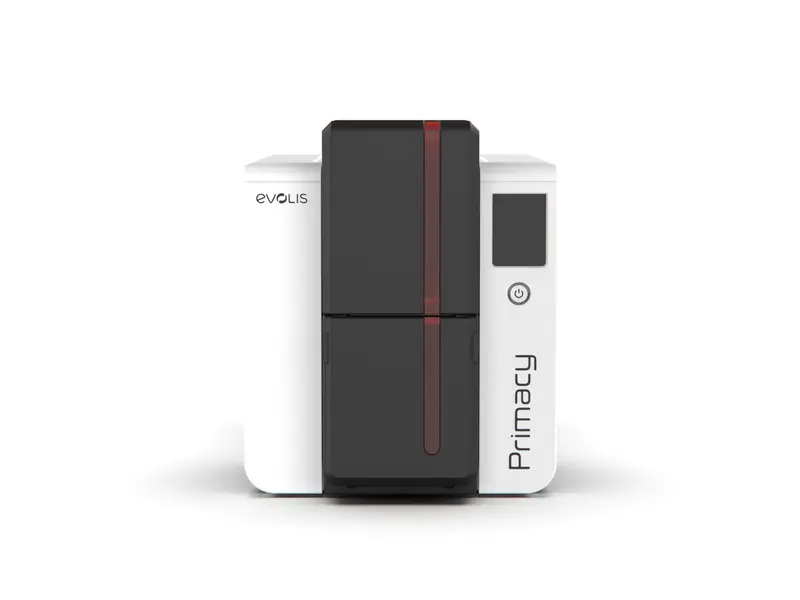
A business approves the purchase of a new card printer, expecting the equipment cost to represent most of the investment. A few months later, additional expenses begin appearing: replacement ribbons, blank cards, cleaning supplies and software-related charges.
None of these costs is necessarily unusual. They are part of operating specialised printing equipment.
The problem occurs when businesses fail to account for them before purchasing.
Understanding the full cost of a plastic card printer can help organisations set realistic budgets and compare equipment more accurately.
Instead of concentrating only on the advertised price, buyers should consider the expenses associated with producing, maintaining and replacing cards throughout the printer's working life.
The Purchase Price Is Only the Starting Point
The initial cost of card-printing equipment varies according to technology, speed and features.
Compact desktop systems may cost less than specialised printers with advanced personalisation capabilities.
However, two machines with similar purchase prices can have different operating expenses.
What Should Your Initial Budget Include?
In addition to the printer, businesses may need:
-
Blank plastic cards.
-
Printing ribbons.
-
Card design software.
-
Cleaning materials.
-
USB or network accessories.
-
Cardholders and lanyards.
-
Electronic encoding modules, where required.
Not every item is necessary for every installation.
Confirm what is included in the printer package before purchasing additional accessories.
Printing Ribbons Are a Recurring Expense
Many plastic card printers rely on specialised ribbons to produce text, photographs and graphics.
Different printing requirements can involve different ribbon types.
Understand Ribbon Yield
A ribbon's stated yield indicates the expected number of cards or printable surfaces it supports under specified conditions.
When comparing cardprinters, examine ribbon pricing and yield together.
A lower-cost ribbon may not provide better value if it produces substantially fewer completed cards.
Why Printing Style Affects Consumption
Full-colour photographs and monochrome text do not necessarily use the same printing materials.
Double-sided designs may also require additional ribbon resources.
Calculate Your Effective Ribbon Cost
Suppose a hypothetical ribbon costs $120 and produces 300 cards.
The ribbon cost would be approximately $0.40 per card.
If another ribbon costs $90 but produces only 150 cards, its cost would be $0.60 per card.
These examples exclude blank cards, equipment and other expenses.
Blank Card Costs Can Vary
Plastic cards differ in material, thickness, colour and embedded technology.
A standard blank card may cost less than one containing electronic components.
Check Compatibility Before Buying in Bulk
Not every printer supports every card type.
Specialised cards may require particular printing technologies or encoding capabilities.
Buying incompatible materials can create unnecessary costs and potentially interrupt operations.
Businesses should confirm the correct card specifications before ordering large quantities.
Software Licensing May Affect Your Budget
A printer needs suitable software or a compatible printing workflow.
Some machines include basic design software, while advanced features may involve additional costs.
Basic Versus Advanced Functions
Standard software may support text, photographs and simple card layouts.
Additional features could include database connectivity, batch personalisation or specialised encoding.
Before selecting a printer for plastic cards, establish which software functions your organisation requires.
Avoid Paying for Unused Capabilities
A small business producing straightforward membership cards may not need advanced database integration.
By contrast, an organisation managing thousands of individual records may benefit from automated personalisation.
The most suitable software licence depends on the workflow rather than the size of the company alone.
Maintenance and Cleaning Are Ongoing Responsibilities
Card printers contain components that need routine cleaning and inspection.
Dust, unsuitable materials and neglected maintenance can affect printing performance.
Plan for Preventive Care
Check the manufacturer's recommended cleaning schedule and required materials.
Regular maintenance may help reduce avoidable printing defects and operational interruptions.
What About Repairs and Servicing?
Warranty coverage varies by manufacturer and model.
Some repairs or replacement components may not be covered under normal warranty conditions.
Review the written terms before purchasing and consider how unexpected downtime could affect your operations.
Printing Errors Can Create Material Waste
Even an appropriate printer can produce unusable cards when information is incorrect or the layout has not been checked.
A misspelled name, outdated photograph or incorrect card orientation may require another card to be printed.
Reduce Avoidable Reprints
Businesses can manage this expense through simple procedures:
-
Verify personal details before printing.
-
Use approved design templates.
-
Check image quality.
-
Test new layouts before printing large batches.
-
Train staff on correct card handling.
-
Maintain current consumable stock.
For organisations using cardprinters regularly, reducing avoidable reprints can help control ongoing costs.
Consider the Cost of Staff Time
Operating a printer involves more than pressing a print button.
Employees may need to prepare data, check designs, replace supplies and distribute completed cards.
Compare Manual and Automated Processes
For occasional printing, a straightforward manual process may be entirely suitable.
Larger organisations may benefit from compatible database tools or higher-capacity equipment.
However, automation should be evaluated against its purchase and setup costs.
A printer for plastic cards should fit the organisation's existing administrative processes rather than require unnecessary additional work.
How Do You Calculate Total Ownership Cost?
A realistic budget should cover the period the business expects to use the equipment.
A Hypothetical Three-Year Example
|
Expense |
Estimated cost |
|
Initial printer purchase |
$1,800 |
|
Printing ribbons |
$900 |
|
Blank cards |
$450 |
|
Cleaning and maintenance |
$250 |
|
Additional software |
$200 |
|
Total |
$3,600 |
These figures are illustrative and are not quotations from InteractCard Australia.
The actual cost depends on equipment specifications, usage and operating conditions.
Businesses should also consider staff time, possible repairs and downtime.
Why Choose InteractCard Australia?
InteractCard Australia supplies Evolis printers and associated identification card products.
Its range includes printing ribbons, blank cards, software, cleaning kits and identification accessories.
Customers comparing cardprinters can examine related consumables alongside the equipment itself.
This is useful when estimating the full investment required for a particular printing application.
About Us – InteractCard Australia
InteractCard Australia supplies plastic identification card-printing equipment and related accessories for organisations across Australia.
Its product categories include Evolis printers, card design software, compatible consumables and identification products.
Businesses researching a plastic card printer can explore available models and assess their suitability for different printing requirements.
The range also includes equipment and supplies relevant to employee identification, membership cards and other plastic card applications.
Look Beyond the Price Tag
The most affordable card printer is not always the machine with the lowest purchase price.
Ribbon yield, card compatibility, maintenance, software and printing errors all influence the amount a business spends over time.
Before investing, estimate how many cards you expect to produce and calculate the costs associated with that workload.
A realistic ownership budget can help you compare equipment fairly and avoid financial surprises after installation.

 English
 French
 Spanish
 Portuguese
 Deutsch
 Turkish
 Dutch
 Italiano
 Russian
 Romaian
 Portuguese (Brazil)
 Greek
